


PDF viewer and document toolkit for React Native on the New Architecture. Documents, downloads and editing live in Nitro modules; the viewer is a Fabric component that renders with PDFium on Android and PDFKit on iOS.
If you need production-grade background infrastructure designed on the same high-performance architecture principles, my commercial cross-platform modules are now shipping:
A pure native implementation engineered on the New Architecture (TurboModules / JSI) that survives aggressive OS process kills, system reboots, and network dropouts without relying on heavy third-party tracking SDKs.
- Android Layer: Native Kotlin Foreground Service (
foregroundServiceType="location") +AlarmManagerself-healing watchdog - iOS Layer: Native Swift
CLLocationManager+CLBackgroundActivitySession(iOS 17+) + local SQLite3 queue - Data Integrity: Offline-first caching with duplicate-free, transactional batch server syncing
Android (ForegroundService) |
iOS (CLLocationManager) |
|---|---|
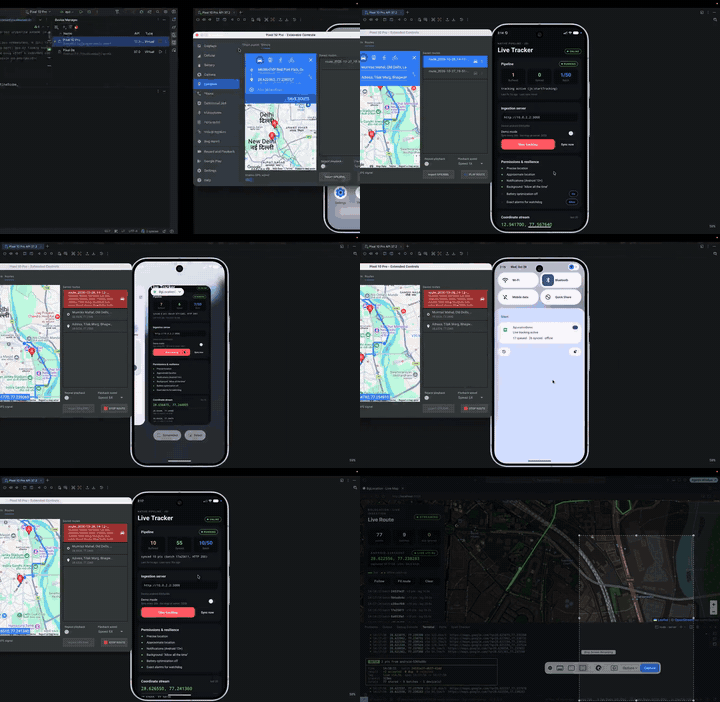 |
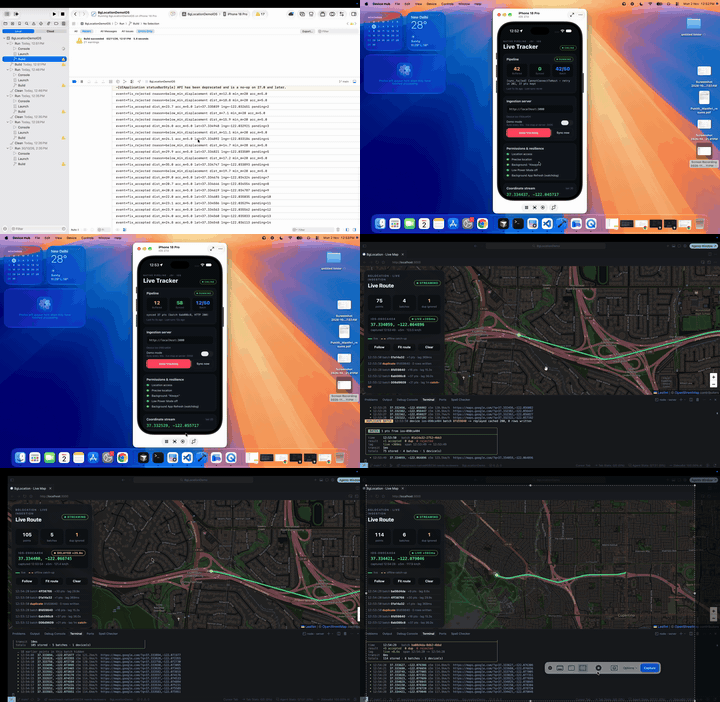 |
| Watch Android demo (MP4) | Watch iOS demo (MP4) |
Don't take the demo videos on faith. The free evaluation package runs the complete native engine inside your own app, so you can watch it survive process kills, go offline and resync on your own routes and devices before you spend anything.

npm i react-native-background-location-pro-eval
cd ios && pod install
import LocationTracker from 'react-native-background-location-pro-eval';
LocationTracker.startTracking('https://your-server.example.com');- ✅ Free in development: the same offline queue, duplicate-free sync, motion gate and self-healing watchdog that ship in the paid editions
- 🔒 Production and store builds need a license: they report
buildTier: 'release'and tracking stays off - 💎 Ready to ship? Pick an edition below to get the full source with lifetime updates
Pay once, no ongoing subscription. Private codebase access is processed and attached to your GitHub account via one-time tiers:
- Android Edition — $39 USD / ₹3,000 INR
- iOS Edition — $59 USD / ₹5,000 INR
- Best Value Bundle (Both Platforms) ⭐ — $89 USD / ₹7,000 INR
👉 Sponsor on GitHub to Get Access Now →
👉 Review the Full Capabilities Matrix & Codebase Blueprints →
6.x is the current release and the npm latest tag, so a plain install gets it:
# npm
npm install react-native-pdf-jsi react-native-nitro-modules

# yarn
yarn add react-native-pdf-jsi react-native-nitro-modules

# pnpm
pnpm add react-native-pdf-jsi react-native-nitro-modules
Which version you get:
| Command | Installs |
|---|---|
react-native-pdf-jsi (no version) or @latest |
6.1.1 (New Architecture) |
react-native-pdf-jsi@4.5.0 |
4.5.0 (Old Architecture) |
Apps still on the Old Architecture should pin react-native-pdf-jsi@4.5.0. Check what is published with npm view react-native-pdf-jsi dist-tags.
Upgrading from 5.x or 4.x: follow MIGRATION-6.0.md.
Use 6.0 if:
- Your app runs on the New Architecture (React Native 0.76 or newer).
- You want the viewer to scroll and zoom natively, with no JavaScript work per frame.
- You open remote PDFs and need them cached, available offline, or fetched with auth headers.
- You need document work from JavaScript: search, text extraction, page images, editing, forms, merge, split or compression.
- You want TypeScript types and errors you can match on.
Stay on 4.5.0 if:
- Your app still uses the Old Architecture (Paper). 6.0 has no fallback.
- You ship on Windows.
- You can't take a breaking upgrade yet: 6.0 changes viewer props and makes every page index zero-based.
- One native dependency.
react-native-nitro-modulesis the only native peer.react-native-blob-util, AsyncStorage,crypto-js, AndroidPdfViewer,pdfiumandroidand Gson are no longer needed. - Native viewer. Android renders pages in tiles on a background thread; iOS uses PDFKit. Page events arrive as soon as the visible page changes, even mid-scroll; zoom events arrive once zooming settles. Neither is sent on every frame.
- Dependable downloads. Remote documents are revalidated with ETag / Last-Modified, served from disk when offline, resumed after an interruption (files of 32 MB and more), shared between concurrent requests, and kept under a size limit.
- Predictable API. Pages are zero-based everywhere. Taps, highlights and search results share one coordinate system. Failures are
PdfErrors with stable codes. - Safe editing. Rotations, deletions, annotations and form values stay in memory until you call
save(path). - Memory you can control. Open documents are reference-counted and shared, with a small warm pool that empties on memory warnings.
- TypeScript. The package is written in TypeScript and ships generated type declarations.
flowchart TB
  app[Your app] --> js["JS API: PdfView, PdfPage, usePdfDocument, PdfCache, PdfFiles"]
  js --> fabric["Fabric views: RNPDFPdfView, RNPDFPdfPageView"]
  js --> nitro["Nitro hybrid objects: PdfLibrary, PdfDocument, PdfCache"]
  fabric --> androidView["Android: Kotlin tiled viewer"]
  fabric --> iosView["iOS: PDFKit view"]
  nitro --> pdfium["Android: PDFium (C++)"]
  nitro --> pdfkit["iOS: PDFKit and Vision (Swift)"]
  nitro --> disk["Native download cache"]
Nitro owns documents, Fabric owns the screen. Opening, rendering, searching, editing and downloading are Nitro hybrid objects (PdfLibrary, PdfDocument, PdfCache) called directly over JSI. The Fabric components (PdfView, PdfPage) only display. A document opened from JavaScript is the same one a view or thumbnail draws, so edits show without reopening the file.
Android has its own viewer on PDFium. AndroidPdfViewer was replaced by a Kotlin viewer: one bitmap per visible page, plus 512 px tiles when zoomed in, rendered by a single prioritised thread. Bitmaps are kept in a cache measured in bytes that shrinks under memory pressure, so large documents stay within a fixed budget.
iOS uses the system engines. PDFKit draws pages and Vision handles OCR, so nothing is bundled on iOS.
Downloads moved into native code. PdfCache streams files straight to disk on a native thread instead of passing them through JavaScript with blob-util. Three cache modes cover the common cases: none (fresh each time), session (default, size-limited) and persistent (kept until removed).
One page and coordinate convention. Every API takes and returns zero-based pages. Positions are PDF points from the top-left corner of the displayed page, so a search result's rect can be passed straight to highlights.
Errors are values with codes. Every rejection and viewer error is a PdfError whose code (download-failed, password-required, invalid-page, …) is the same on both platforms.
Edits are explicit. Changes to a document are held in memory and written only by save(path), so the source file is never modified by accident.
New Architecture only. Dropping the Old Architecture and Windows keeps one code path per platform.
| React Native | 0.76 or newer, New Architecture enabled |
react-native-nitro-modules |
^0.37.1 |
| iOS | 13.0+ |
| Android | minSdkVersion 21+ |
| Expo | Development build (Expo Go is not supported) |
npm install react-native-pdf-jsi react-native-nitro-modules
cd ios && pod install
To show saved files in the iOS Files app, add UIFileSharingEnabled and LSSupportsOpeningDocumentsInPlace (both true) to Info.plist. See Saving files.
npx expo install react-native-pdf-jsi react-native-nitro-modules{
"expo": {
"plugins": [["react-native-pdf-jsi", { "ocr": false }]]
}
}Then run npx expo prebuild --clean. The plugin turns on the New Architecture, checks that react-native-nitro-modules is installed, and adds the iOS Files app keys. Options:
ocr: enables Android ML Kit text recognition. iOS OCR uses Vision and needs nothing.iosFileSharing: set tofalseto leaveInfo.plistalone.pdfiumDir/pdfiumUrl: local copy or mirror of the Android PDFium binaries, for builds that cannot reach GitHub. See Android PDFium binaries.
Step-by-step Expo setup, code changes and Xcode 27 / iOS 27 fixes: EXPO-6.0.md.
The prebuilt PDFium libraries (about 23 MB) are not in the npm package. The first Android build downloads them from this repo's GitHub Releases, checks the SHA-256 and caches them in ~/.gradle/caches/react-native-pdf-jsi/. Later builds use the cache.
For builds without access to GitHub, set one of these in android/gradle.properties:
pdfJsiPdfiumDir=/path/to/pdfium: a directory containinglib/<abi>/libpdfn.so, for example the unzipped release asset.pdfJsiPdfiumUrl=https://mirror.example.com/pdfium-android-r1.zip: a mirror of the release zip. The checksum is still verified.
With Expo, use the plugin options pdfiumDir and pdfiumUrl instead; prebuild writes these properties for you.
import { useRef } from 'react';
import { PdfView, type PdfViewRef } from 'react-native-pdf-jsi';

export function Reader() {
  const viewer = useRef<PdfViewRef>(null);

  return (
    <PdfView
      ref={viewer}
      style={{ flex: 1 }}
      source={{ uri: 'https://example.com/report.pdf', cache: 'persistent' }}
      onLoad={({ pageCount }) => {
        console.log('pages', pageCount);
        viewer.current?.goToPage(4);
        viewer.current?.zoomTo(2, { animated: true });
      }}
      onPageChange={({ page, pageCount }) => console.log(`${page + 1}/${pageCount}`)}
      onError={(error) => console.warn(error.code, error.message)}
    />
  );
}
Other viewer props include initialPage, initialScale, horizontal, enablePaging, enableRTL, fitPolicy ('width' | 'height' | 'page'), highlights, password and onPasswordRequired. The full list is in MIGRATION-6.0.md.
{ uri: 'https://…', headers: { Authorization: 'Bearer …' } } // session cache (default)
{ uri: 'https://…', cache: 'persistent' }                    // kept until removed, still revalidated
{ uri: 'https://…', cache: 'none' }                          // downloaded every time
{ uri: 'https://…', maxAgeMs: 60_000, cacheKey: 'invoice-42' }
{ filePath: '/path/to/file.pdf' }
{ base64: 'JVBERi0…' }
require('./manual.pdf')
import { PdfCache } from 'react-native-pdf-jsi';
await PdfCache.download({ uri, cache: 'persistent' }); // fetch ahead of time
PdfCache.maxCacheBytes = 500 * 1024 * 1024; // session cache limit
await PdfCache.clear();import { PdfPage, usePdfDocument } from 'react-native-pdf-jsi';
function Thumbnail({ uri }: { uri: string }) {
const { document } = usePdfDocument({ uri });
if (!document) return null;
return <PdfPage document={document} page={0} style={{ height: 120 }} />;
}const image = await document.renderPage(0, { maxWidth: 1080, format: 'jpeg', quality: 85 });
const matches = await document.searchText('invoice', 0, document.pageCount - 1); // rects fit `highlights`
const text = await document.extractText(0);
await document.rotatePage(0, 90);
await document.deletePage(3);
await document.addAnnotation({ page: 0, type: 'highlight', rect: { x: 72, y: 72, width: 200, height: 20 } });
await document.setFormFieldValues({ name: 'Ada' });
await document.save(outputPath); // nothing is written before thisSaving with a password is supported on iOS; on Android it rejects with unsupported-operation.
import { getPdfLibrary } from 'react-native-pdf-jsi';

const library = getPdfLibrary();
await library.mergePDFs([a, b], outputPath);
await library.splitPDF(filePath, JSON.stringify([[0, 9], [10, 19]]), outputDir);
await library.extractPages(filePath, JSON.stringify([0, 2]), outputPath);
await library.compressPDF(inputPath, outputPath, 6);A native document holds PDFium / PDFKit memory that the JavaScript garbage collector cannot see. usePdfDocument releases it on unmount. Outside components, prefer withPdfDocument, which releases the document even if the callback throws:
import { withPdfDocument } from 'react-native-pdf-jsi';

const text = await withPdfDocument(filePath, (document) => document.extractText(0));
For a document that stays open across several calls, pair acquirePdf with releasePdf:
import { acquirePdf, releasePdf } from 'react-native-pdf-jsi';

useEffect(() => {
  acquirePdf(filePath).then(setDocument, setError);
  return () => releasePdf(filePath);
}, [filePath]);- Concurrent opens of the same path share one native document.
- Released documents stay in a warm pool of 2 so reopening is instant. The pool empties on memory warnings, or call
trimPdfCache(). - Call
invalidatePdf(path)after overwriting a file, so the next open reads the new contents. getPdfRegistryStats()reports open, referenced, pinned, warm and stale counts, which helps when checking for leaks.
PdfFiles.saveToDownloads(path, fileName) (or FileManager.downloadToPublicFolder) saves a copy natively: into the public Downloads folder through MediaStore on Android, and into the app's Documents folder on iOS.
On iOS the Documents folder shows in the Files app only when the app's Info.plist sets UIFileSharingEnabled and LSSupportsOpeningDocumentsInPlace to true. The Expo plugin adds both (opt out with { "iosFileSharing": false }); bare apps add them by hand. FileManager.openDownloadsFolder() opens the app's folder in the Files app.
Paths returned for viewed documents point into the library's cache. To keep a document, load it with cache: 'persistent' or copy it with PdfFiles.copy(path, `${PdfFiles.documentDirectory}/name.pdf`).
import { isPdfError } from 'react-native-pdf-jsi';

try {
  await document.renderPage(99);
} catch (error) {
  if (isPdfError(error) && error.code === 'invalid-page') {
    // …
  }
}
Codes: invalid-source, download-failed, password-required, password-incorrect, unsupported-pdf, page-render-failed, out-of-memory, invalid-page, invalid-argument, unsupported-operation, io-error, cancelled, document-closed, unknown. Match on code; messages may change. errorMessageFor(error) returns a readable English message.
- From 5.x or 4.x to 6.0: MIGRATION-6.0.md
- Expo apps on 6.0: EXPO-6.0.md
- From 4.x to 5.0: MIGRATION-5.0.md
- Release notes: CHANGELOG.md
If this library helps your team, you can support ongoing maintenance here: Become a GitHub Sponsor.
The package prints a short sponsorship message after install. It is skipped in CI; to hide it elsewhere, set RN_PDF_JSI_HIDE_BANNER=1.