


English | 简体中文
AfterChat is a free, open-source AI chat exporter / conversation backup tool.
Export chats from ChatGPT, Claude, Gemini, DeepSeek, GLM, Qwen and 30 major AI platforms to Markdown files with one click, fully preserving reasoning / thinking and citation sources for personal backup, migration and offline reading.
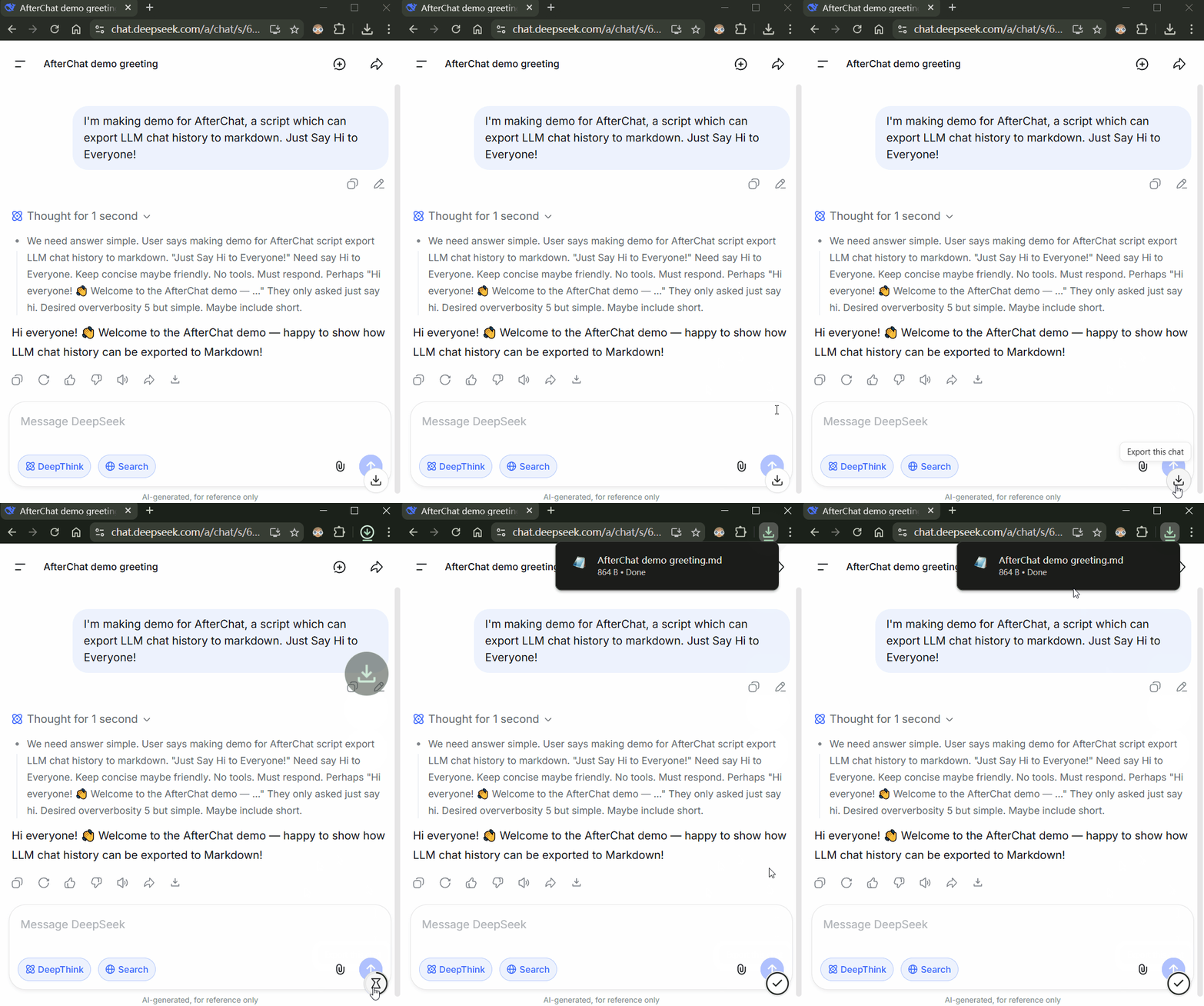
Left-click the floating button in the bottom-right corner to export current chat to Markdown
After installing Violentmonkey (Chrome / Firefox) or Tampermonkey (Chrome / Firefox), click the link below and confirm in the popup:
👉 Install AfterChat — LLM Chat Exporter (Greasy Fork)
The script shows a circular download button in the bottom-right corner of the page:
| Scenario | Action | Result |
|---|---|---|
| Conversation page | Left-click | Export current conversation (download as .md) |
| Conversation page | Right-click | Save to AfterChat (sync into desktop workspace) |
| Project page | Left-click | Project batch export: pack only conversations within the current project / workspace |
| Default page | Left-click | Incremental batch export: pack only new conversations, skipping already-exported ones |
| Default page | Shift + left-click | Force full export: re-fetch and pack all conversations |
Install the AfterChat Desktop App, and right-click the button on a conversation page to save it directly into your desktop workspace:
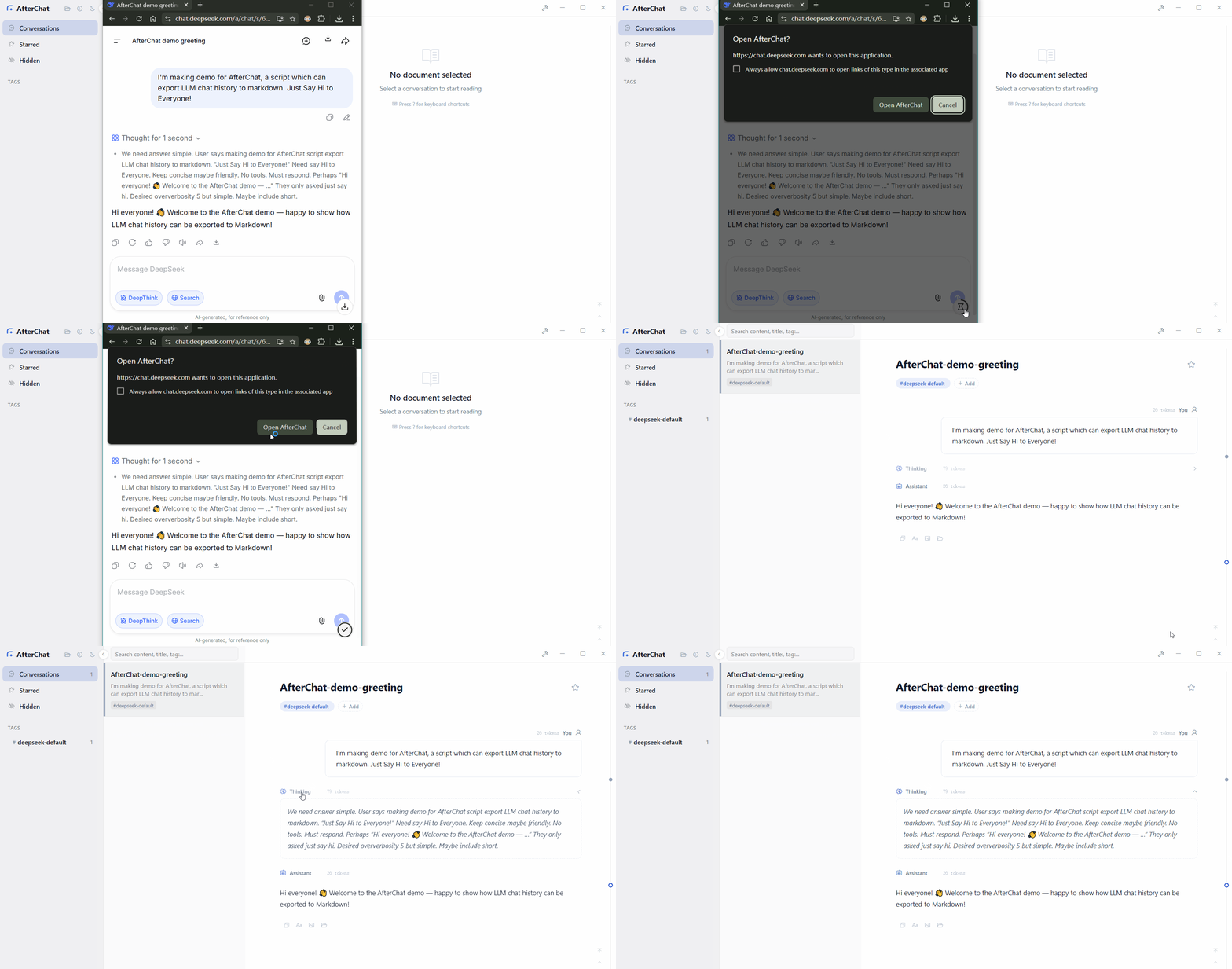
Right-click to sync directly into AfterChat without manual file organization
- Multi-platform support: works with 30 major LLM platforms.
- Single or batch export: exports the current conversation or all conversations at once.
- Project / Workspace export: automatically detects project and workspace folders to batch-export conversations within the project.
- Incremental export: on the list page, batch export skips conversations you've already downloaded (by update-time anchor) and only fetches new/updated ones — dramatically faster on repeat runs.
- Content fidelity: exports include user messages, AI replies, reasoning / thinking, and citation sources.
- One-click save to AfterChat: on a conversation detail page, right-click the button to save the current conversation directly to your AfterChat Desktop App workspace.
| Platform | Site |
|---|---|
| ChatGPT | chatgpt.com |
| Claude | claude.ai |
| Google Gemini | gemini.google.com |
| Google AI Mode | google.com/ai |
| Grok (X) | x.com/i/grok |
| Grok | grok.com |
| DeepSeek | chat.deepseek.com |
| Microsoft Copilot | copilot.com |
| M365 Copilot | copilot.cloud.microsoft |
| Perplexity | perplexity.ai |
| Kimi | kimi.com |
| Doubao | doubao.com |
| ChatGLM | chatglm.cn |
| Z.ai (GLM) | chat.z.ai |
| Qwen | chat.qwen.ai |
| Qianwen | qianwen.com |
| Poe | poe.com |
| Tencent Yuanbao | yuanbao.tencent.com |
| Tencent Hunyuan | aistudio.tencent.com / aistudio.tencent.ai |
| MiniMax | agent.minimax.io / agent.minimaxi.com |
| Mistral Le Chat | chat.mistral.ai |
| Monica | monica.im |
| Google AI Studio | aistudio.google.com |
| DuckDuckGo AI Chat | duck.ai |
| Tencent IMA | ima.qq.com |
| Sakana AI | chat.sakana.ai |
| Arena AI | arena.ai |
| Dola | dola.com |
| StepFun AI Studio | studio.stepfun.ai / studio.stepfun.com |
| StepFun Chat | chat.stepfun.com |
Your privacy matters. The script does not collect any information from you.
The script runs with @grant none, sends no data to any third party, and exported files are only stored locally.
- AfterChat-Converter: Converts scattered chat history backups from various AI platforms and third-party clients into consistently formatted Markdown documents in one click. Supports official exports and client backups from ChatGPT, Claude, Qwen, Google AI Studio, Cherry Studio, RikkaHub, and more.
- AfterChat Desktop App: manage your conversations and build a knowledge base locally.
- This script pulls data through each platform's front-end same-origin API. These are unofficial interfaces and may stop working when platforms update, so please keep it updated.
- If a platform breaks, please report it on Greasy Fork or open a GitHub issue.
- Pull requests are welcome! If you find this useful, please star the repo.
- Please follow each platform's terms of service. Exported content is intended for personal backup and learning only.
Licensed under the GNU Affero General Public License v3.0.