Extract data from invoices, receipts and contracts with a source line for every field, check it with plain code, and flag what a person must review.
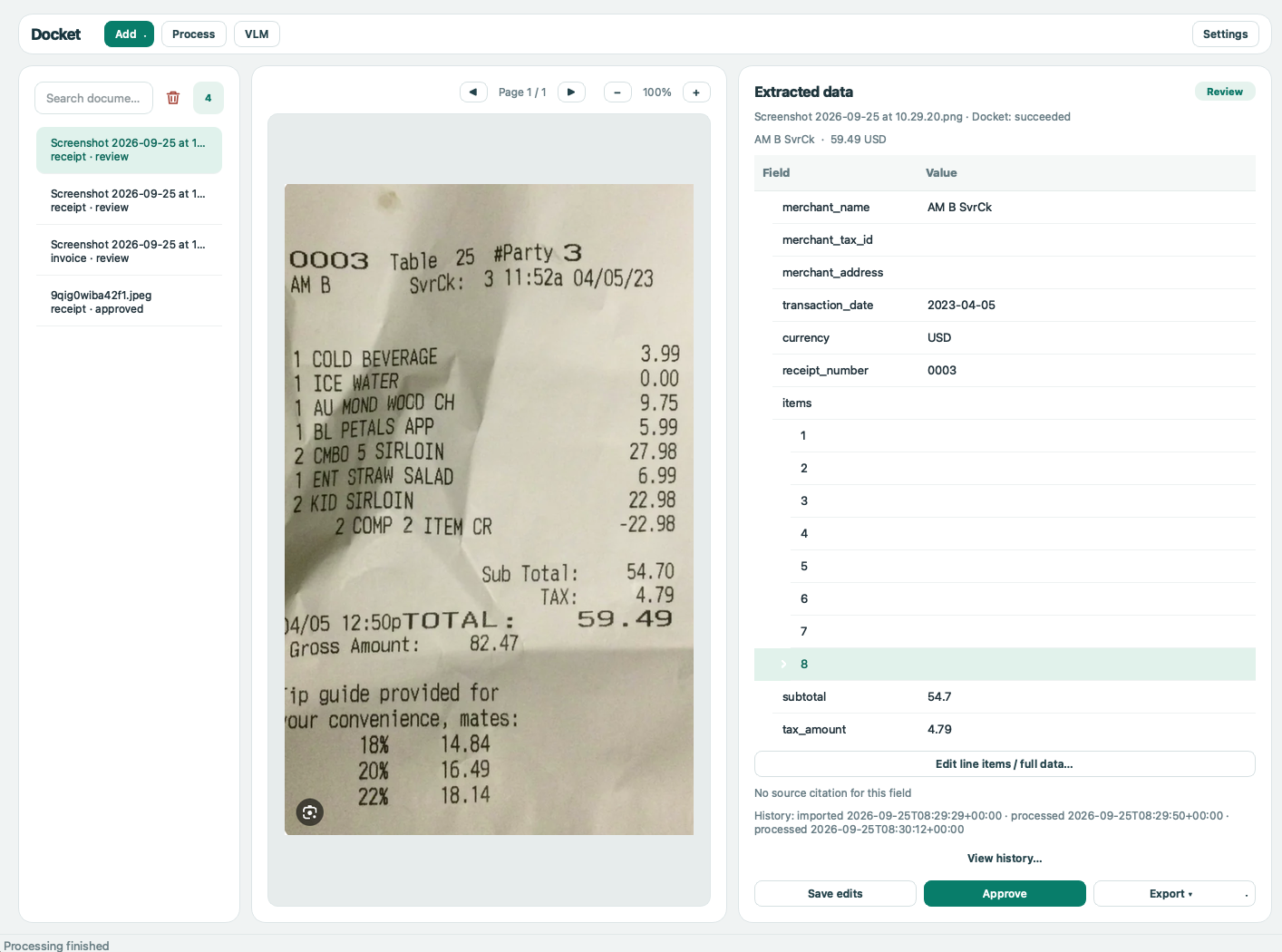
Docket Desktop
You need Python 3.10+, Tesseract for scans, and a text model you run or reach: Ollama, or any OpenAI-compatible server (vLLM, llama.cpp, LM Studio, a hosted API). Docket ships no default model; Language models has local recipes.
pip install docket-idp
export DOCKET_TEXT_MODEL=<model>         # e.g. a model you have pulled in Ollama
export DOCKET_VISION_MODEL=<vision-model>  # or DOCKET_OCR_FALLBACKS= to go without
docket process invoice.pdf
The command prints a JSON result. Its exit code is 0 for succeeded, 1 for needs_review, 2 for failed, or 3 for a configuration error; docket config show lists the active settings. An excerpt of a real result, for a published ZUGFeRD sample invoice whose seller VAT number is invented:
{
  "status": "needs_review",
  "document_type": "invoice",
  "extracted": {
    "invoice_number": "TX-471102",
    "issue_date": "2018-10-30",
    "total_amount": 18.08,
    "currency": "EUR"
  },
  "field_sources": {
    "total_amount": {"page": 2, "quote": "Zahlbetrag | 18,08", "status": "verified", "match": "exact"}
  },
  "review_reasons": [
    "validation error: seller.tax_ids[0] — 'DE123456789' fails its country's VAT checksum"
  ]
}
On the project's small test sets, the checks sent 97 of 97 planted mistakes to review, field accuracy was 0.95–1.00 on 21 labeled documents and 28 European sample invoices, and up to 3 documents per run still passed with a wrong field. Benchmarks has the details.
Use the typed result in your own application. Keep results needing review out of automatic downstream updates.
from docket import DocumentStatus, ProcessOptions, process_document

result = process_document("invoice.pdf", ProcessOptions(document_type="invoice"))
if result.status == DocumentStatus.SUCCEEDED:
    print(result.document)
    print(result.field_sources.get("total_amount"))
else:
    print(result.status.value, result.review_reasons)
result.document is a Pydantic schema; each available field source includes its page, quote and location. Seven built-in document types are listed by docket schemas list. You can register another schema or OCR backend; see the examples.
Batch processing writes a summary CSV, a line-item CSV and a checkpoint file. Repeating the command resumes completed documents; one failure does not stop the rest.
docket batch scans/ --recursive --workers 4 --format csv --output results.csvUse --format jsonl for one complete result per line or --ocr-backend paddle after installing the optional PaddleOCR backend.
Install the validator and fetch official rule files that cannot be shipped in the package. Export is refused when the extracted result needs review or the invoice cannot be represented faithfully.
pip install "docket-idp[einvoice]"
docket einvoice fetch
docket process invoice.pdf --document-type invoice --export xrechnung-ubl --validate-export -o invoice.xml
Other built-in formats include UBL, Peppol, XRechnung CII, Factur-X and Facturae (docket formats). Converting a supplier PDF gives you data for your books; it does not issue a legal e-invoice on the supplier's behalf.
document → read text → classify → extract + cite → check → JSON, or review
- Read the text. A PDF with a usable text layer is read directly, with no OCR and no model. A scan or photo goes through OCR (Tesseract by default, or PaddleOCR or Docling). If OCR confidence is too low, or the text model judges the OCR text to be garbage, the vision model reads the page image instead.
- Classify. Keyword rules decide first, then a TF-IDF model. The text model is asked only when neither is confident.
- Extract. The text model fills the document's schema, such as number, dates, parties, amounts and line items. For every field it cites the line it read the value from. An invoice from a registered vendor template is read by that template, with no model call.
- Check. Plain code, with no model involved, compares each value with the line it cites. It also checks the arithmetic, dates, and IBAN and VAT check digits. If the checks fail, the page is read again by the vision model and the better result is kept. Anything still wrong or uncertain is marked
needs_reviewinstead ofsucceeded. - Output. Every result comes out as JSON (
docket process) or as CSV and JSONL rows (docket batch), with its status and review reasons. An e-invoice export (UBL, Peppol, XRechnung, Factur-X, Facturae) is refused unless the result passed its checks.
The architecture describes the stages and extension points.
| Environment variable | Default | Purpose |
|---|---|---|
DOCKET_LLM_PROVIDER |
ollama |
ollama or openai for an OpenAI-compatible endpoint |
DOCKET_TEXT_MODEL / DOCKET_VISION_MODEL |
unset | Extraction model (required) / page-image model |
DOCKET_LLM_STRUCTURED_OUTPUT |
json_schema |
Send the schema to OpenAI-compatible servers for constrained decoding, or json_object |
OLLAMA_HOST |
http://localhost:11434 |
Ollama server URL |
DOCKET_LLM_BASE_URL |
https://api.openai.com/v1 |
OpenAI-compatible API URL |
DOCKET_LLM_API_KEY |
unset | Key for the OpenAI-compatible API |
DOCKET_OCR_BACKEND / DOCKET_OCR_FALLBACKS |
auto / vlm |
Primary OCR / fallback chain |
DOCKET_OCR_LANGUAGES |
en |
Comma-separated language codes, e.g. en,de |
DOCKET_MIN_SOURCE_CONFIDENCE |
0.8 |
Minimum OCR confidence for cited key fields |
DOCKET_CONFIG |
unset | TOML file; environment and explicit options override it; CLI also reads ./docket.toml |
- Python 3.10 or newer on macOS or Linux; CI tests Python 3.10–3.12 on Ubuntu.
- Tesseract on
PATHfor scanned pages, or install the optional PaddleOCR or Docling backend. Usable PDF text layers need no OCR engine. - A reachable Ollama server or OpenAI-compatible API, with a text model configured. The
vlmfallback also needs a vision model. - The
[einvoice]extra anddocket einvoice fetchfor official e-invoice validation. - The desktop app is a separate source package in
apps/desktop; its native build targets macOS.
- Wrong fields can still pass as
succeeded. Review critical values before use. - The vision model can change digits to reconcile totals.
- Windows is untested. The local macOS app build is unsigned and unnotarized.
- The desktop workflow handles invoices and receipts; contracts and e-invoice tools remain in the library and CLI.
Desktop app, extras, HTTP API and development
From a checkout, install the separate package with python -m pip install -e . -e apps/desktop and run docket-desktop. It imports PDF/images, supports correction and approval, and exports approved data as XLSX, CSV or JSON. See the desktop guide.
docket-idp[api] adds the HTTP service; [photo] adds photo cropping; [paddle] and [docling] add OCR backends; [review] adds the persistent review queue. See pyproject.toml for the full list.
docker run -p 8000:8000 -e DOCKET_API_KEY=secret -e DOCKET_TEXT_MODEL=<model> -e DOCKET_OCR_FALLBACKS= ghcr.io/kazkozdev/docket
curl -H "Authorization: Bearer secret" -F file=@invoice.pdf localhost:8000/process
The image looks for Ollama at host.docker.internal:11434; on Linux add --add-host=host.docker.internal:host-gateway. See the OpenAPI specification for endpoints and responses.
git clone https://github.com/KazKozDev/docket.git && cd docket
python3 -m venv .venv && source .venv/bin/activate
pip install -e ".[dev]" && pytest



Issues · Contributing · Security · License · Architecture · Benchmarks · Changelog