

English | 한국어
One .NET 8 library for industrial PLC and device communication protocols (Modbus, LS Electric, Mitsubishi, Siemens, Omron, MQTT, SECS/GEM)
Under development (0.x): the API may change between versions.
Devinno.Communication assumes that device communication will be set up with AI (LLM) coding tools: the AI reads a PLC memory map, and the library is built so that its mistakes show up instead of passing silently. People writing the XML and code by hand get the same help.
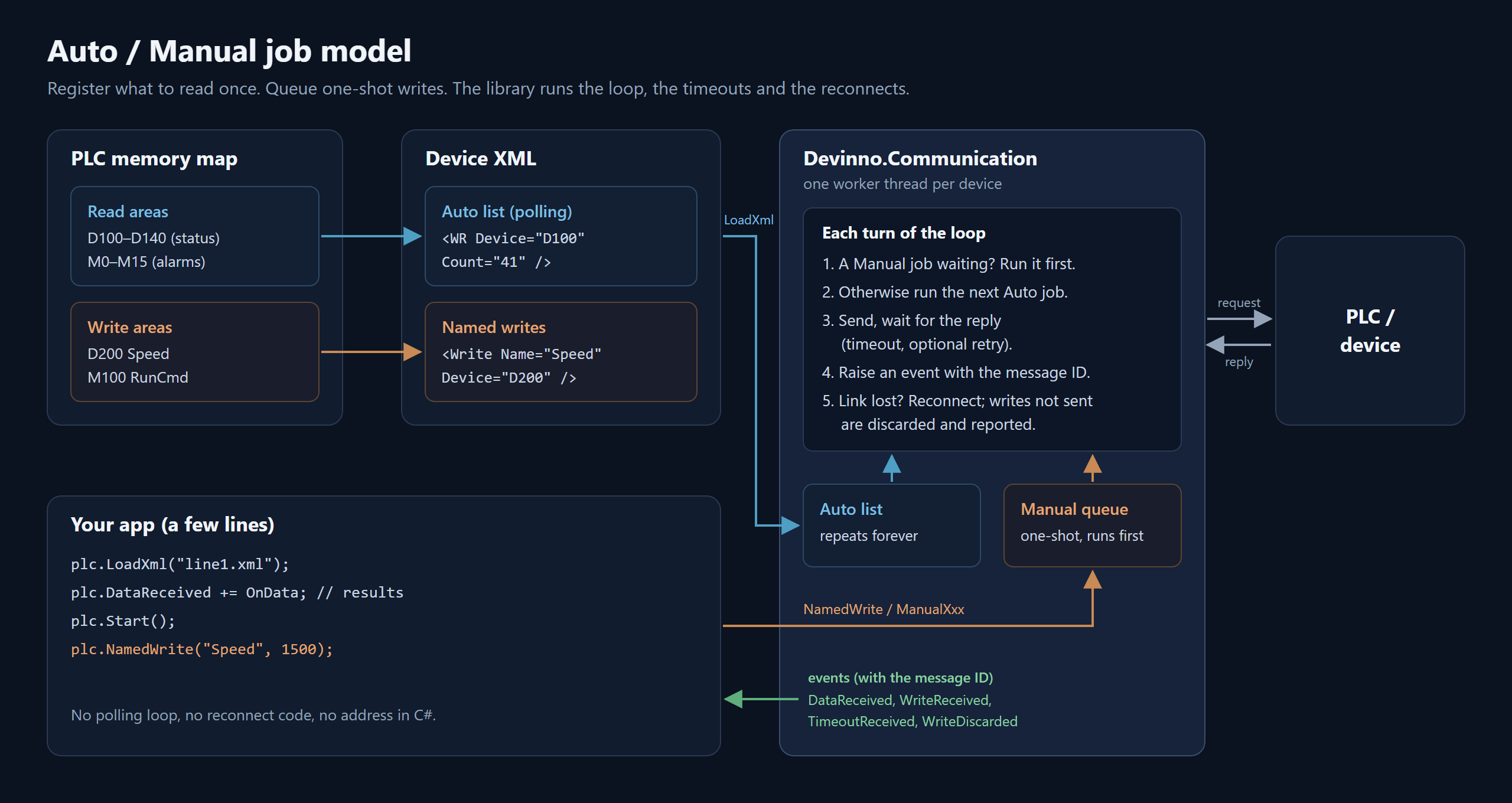
Auto / Manual job model
- Register the reads once (the Auto list) and the library polls them over and over, with its own timeouts and reconnects. A write is queued as a one-shot Manual job and runs before the next Auto job. Results arrive as events carrying the message ID you gave the job.
- From a memory map, the read areas become the Auto list and the write areas become named writes.
Memory map to XML
- The AI writes one XML file per device from the memory map: connection settings, the Auto (polling) list and the named writes.
- Loading is strict. An unknown attribute or element is a load error, and the
FormatExceptionnames the element and the attribute. - An XSD for every root element ships in the package (
docs/schemas/). Tests keep the committed schemas in sync with the code.
Named write
- A write is defined once in the XML with
<Write Name="...">and called from code withNamedWrite("name", value). The names come from the memory map; addresses live only in the XML.
Docs that match the code
llms.txt,llm-rules.mdandcomm-xml-reference.mdship inside the package. On build they are copied to.devinno/Devinno.Communication/, where AI tools can find them.llms.txtis the place to start.- The C# API has English IntelliSense (XML documentation comments on every public API) with Korean (ko) localization.
Evaluated with AI agents
- Fresh AI agents were given only the package docs and three vendor memory maps (Mitsubishi 3E, Modbus TCP, Siemens S7). Each turned its map into an XML file and C# code, and an automated grader passed all of them (every check, 100%; 55 to 58 checks per map). This was repeated in two rounds with two model sizes (Claude Sonnet, then Haiku); the gaps the agents reported were fixed in the docs between the rounds.
- The evaluation is small: one agent per map per round, no real devices, and only these three maps. LS, Omron, serial, TextComm, MQTT and SECS/GEM were not evaluated. The method, scores and limits are in
tests/ai-eval/RESULTS.mdin the repository.
Mistakes show up
- A write made while there is no connection is discarded and reported through
WriteDiscarded. Failure events carryAttempt,IsFinalandRequestSent. Modbus FC6 / FC16 writes throwArgumentOutOfRangeExceptionfor a value out of range. See Write safety.
SECS/GEM
- Three layers: transport (
SecsHsms/SecsSerial), stateless messaging (GemMessages) and the GEM modules (GemEquipment/GemHost). The event order the app sees is documented as a contract, and spooling is optional (off by default).
dotnet add package Devinno.CommunicationPoll holding registers 0 to 9 of a Modbus TCP device continuously, and write one value to address 100 once.
using Devinno.Communication.Modbus.TCP;

var master = new ModbusTCPMaster { RemoteIP = "192.168.0.10", RemotePort = 502 };

// Responses arrive as events (raised on the worker thread)
master.WordReadReceived += (s, e) =>
{
    if (e.MessageID == 1)
        Console.WriteLine($"Holding registers 0-9 = {string.Join(", ", e.ReceiveData)}");
};
master.TimeoutReceived += (s, e) => Console.WriteLine($"Timeout: {e.MessageID}");

// Auto: registered once, polled repeatedly (message ID 1, slave 1, 10 words from address 0)
master.AutoWordRead_FC3(id: 1, slave: 1, startAddr: 0, length: 10);

// Manual: runs once, and is processed before the Auto list.
// Write once connected: a write made while not connected is discarded (WriteDiscarded).
master.DeviceOpened += (s, e) => master.ManualWordWrite_FC6(id: 2, slave: 1, startAddr: 100, value: 1234);   // runs on every (re)connect

master.Start();

Console.ReadLine();
master.Dispose();
The other Master classes follow the same flow: create, attach events, register Auto... / Manual... jobs, Start().
- 9 protocol families, with Master/Slave and Host/Equipment roles
- Auto (repeated polling) and Manual (one-shot) job queues; automatic reconnect when the connection is lost
- Save and load the communication settings and the schedule as XML; XSD schemas generated from the code
- Named write: define a write once in the XML with a name, then call it from code by that name
- Usable from WinForms, WPF, Skia+OpenTK and ASP.NET Core services
- English IntelliSense (XML documentation comments on every public API) with Korean (ko) localization
| Family | Class | Transport | Role |
|---|---|---|---|
| Modbus | ModbusRTUMaster / ModbusRTUSlave |
Serial | Master / Slave |
| Modbus | ModbusTCPMaster / ModbusTCPSlave |
TCP | Master / Slave |
| LS Electric PLC | LsCNet (XGT, RSS/RSB/WSS/WSB) |
Serial | Master |
| LS Electric PLC | LsFEnet (XGT, TCP 2004) |
TCP | Master |
| Mitsubishi PLC | McSerial (MC 1C format 1 and 4, BR/WR/BW/WW) |
Serial | Master |
| Mitsubishi PLC | McEthernet (MC 3E/1E binary, BR/WR/BW/WW) |
TCP | Master |
| Siemens S7 | S7Ethernet (S7comm, ISO-on-TCP 102) |
TCP | Master |
| Omron PLC | FinsUdp / FinsTcp (FINS 9600) |
UDP / TCP | Master |
| Omron PLC | FinsSerial (Host Link FINS) |
Serial | Master |
| TextComm | TextCommRTUMaster / TextCommRTUSlave |
Serial | Master / Slave |
| TextComm | TextCommTCPMaster / TextCommTCPSlave |
TCP | Master / Slave |
| MQTT | MQClient (MQTTnet wrapper) |
TCP | Client |
| SECS/GEM | SecsHsms (HSMS-SS, SEMI E37) |
TCP | Host / Equipment |
| SECS/GEM | SecsSerial (SECS-I, SEMI E4) |
Serial | Host / Equipment |
| SECS/GEM | GemMessages (stateless GEM message builders/parsers) |
— | Host / Equipment |
| SECS/GEM | GemEquipment (SEMI E30, equipment side) |
HSMS / SECS-I | Equipment |
| SECS/GEM | GemHost (GEM host side) |
HSMS / SECS-I | Host |
SECS/GEM has three layers: transport (SecsHsms/SecsSerial), stateless messaging (GemMessages), and GEM modules (GemEquipment/GemHost).
- Modbus functions: FC1, FC2, FC3, FC4, FC5, FC6, FC15, FC16, FC26
- S7-1200/1500 need "PUT/GET" access permitted and "Optimized block access" turned off in the PLC.
- Schedule: Auto jobs are registered once and polled repeatedly. Manual jobs run once and are processed before the Auto list. Responses and errors (timeout, sum check, NAK) arrive as events, and you tell them apart by the message ID you gave when you registered the job.
- Threading: events are raised on the library's worker thread. Keep handlers short, and marshal UI updates yourself (WinForms
BeginInvoke, WPFDispatcher.BeginInvoke, and so on). - Connection events: the Master classes raise
DeviceOpened/DeviceClosed(MQClient:Connected/Disconnected); reconnect is automatic unless turned off. - XML configuration: every class has
SaveXml/LoadXmland a configuration object (...Config, for exampleModbusTCPMasterConfig).ConfigSchema.Get<T>()returns the XSD. One instance is one XML file, and the root element name is the class name. Loading is strict mode: an unknown attribute or element throwsFormatException. Load only while stopped. - Network security: Modbus, S7, FINS, MC and HSMS have no authentication or encryption. Use them only on an isolated, trusted network.
- By default, a write made while there is no connection is not sent: it is reported through the
WriteDiscardedevent instead (NotConnected). Writes still pending when the connection is lost are discarded too (Disconnected). Stop()always empties the pending Manual writes (WriteDiscarded,Stopped).- Set
DiscardWritesWhileDisconnected="false"(property or XML attribute) to restore the old behaviour of keeping writes queued until a connection exists. - Failure events (
TimeoutReceivedand the checksum error events) carryAttempt,IsFinalandRequestSent. IfRequestSentis true, the device may already have executed the request: read it back before writing again. - Every write ends in exactly one of: a success event, a NAK or exception event, a failure event with
IsFinaltrue, orWriteDiscarded. - Do not use
RepeatCountfor pulse, counter or incremental writes: a retry resends a write the device may already have executed. - Modbus FC6 / FC16 Manual writes throw
ArgumentOutOfRangeExceptionfor a value outside -32768..65535. - S7 and FINS block writes are not atomic: when one fails part-way,
WrittenBytes(S7) /WrittenCount(FINS) tell how much was already written. - An FX5 over 3E uses octal X/Y numbers: set
XYNotation="Octal"; withAutothey are read as hexadecimal and address the wrong points. - For the TextComm masters every
ManualSendcounts as a write (the library does not know what a command means), so it is also discarded while there is no connection. - Write right after the connection is up (inside
DeviceOpened), not right afterStart().
The XML holds the connection settings, the Auto (polling) list and a list of named writes. Values are never stored in it.
<ModbusTCPMaster RemoteIP="192.168.0.10" RemotePort="502" Timeout="300">
  <Auto Id="1" Func="FC3" Slave="1" Start="0" Length="10" />
  <Write Name="SpeedSet" Id="100" Func="FC6" Slave="1" Start="100" />
  <Write Name="Recipe" Id="101" Func="FC16" Slave="1" Start="300" />
</ModbusTCPMaster>
using Devinno.Communication;
using Devinno.Communication.Modbus.TCP;
var master = new ModbusTCPMaster();
master.LoadXml("line1.xml"); // only while stopped; the Auto list is registered from the XML
master.Start();
// Named write: queues a Manual job for the <Write> with that name
master.NamedWrite("SpeedSet", 1234);
master.NamedWrite("Recipe", [10, 20, 30]); // a list of long values (FC16 block write)
// XSD for the configuration object
string xsd = ConfigSchema.Get<ModbusTCPMasterConfig>();Named write is available on the 10 PLC masters: ModbusRTUMaster, ModbusTCPMaster, LsCNet, LsFEnet, McSerial, McEthernet, S7Ethernet, FinsUdp, FinsTcp and FinsSerial. The result arrives as an event whose message ID is the Id of the <Write> element.
- Siemens S7: absolute addresses only. Symbols, optimized DBs, timers and counters are not supported.
- Omron FINS: C-mode Host Link, CIP tags, timers and counters are not supported.
- GEM equipment: trace, limits and recipes (S7) are not implemented yet. Spooling (SEMI E30 7.12) is available but off by default (
GemEquipment.SpoolDirectory). - GEM equipment and host: not checked against the original SEMI E30 text; only interoperability with secsgem was verified. Not tested with a real MES or equipment.
- .NET 8.0
- Dependencies: System.IO.Ports, MQTTnet 5.2.0.1603
The package contains these documents in its docs folder:
- the package's
docs/llms.txt(after a build:.devinno/Devinno.Communication/llms.txt): index of the documents, read it first - the package's
docs/llm-rules.md(after a build:.devinno/Devinno.Communication/llm-rules.md): rules, which class to use, memory map to XML procedure - the package's
docs/comm-xml-reference.md(after a build:.devinno/Devinno.Communication/comm-xml-reference.md): every XML root element, attribute, default and range - the package's
docs/schemas/*.xsd(after a build:.devinno/Devinno.Communication/schemas/*.xsd): exact schema of each root element - C# API: XML documentation comments on every public API (IntelliSense;
Devinno.Communication.xmlin the package)
After one dotnet build of an SDK-style project, the package copies its docs to .devinno/Devinno.Communication/ (a restore alone does not). Add this line to your AI instruction file (CLAUDE.md, AGENTS.md, ...):
Devinno library docs: read .devinno/*/llms.txt first.
- To opt out of the copy, set
<DevinnoCopyDocs>false</DevinnoCopyDocs>in the project file. - Add
.devinno/to your.gitignore. - Fallback location:
%UserProfile%\.nuget\packages\devinno.communication\<version>\docs\.
This section describes files that are in the GitHub repository but not in the package.
guide/: per-protocol guides (in Korean) and a common-concepts guide.tests/Devinno.Communication.Tests: xUnit tests. Run them withdotnet test tests/Devinno.Communication.Tests.tests/ai-eval: the AI evaluation kit (memory maps, grading data, the Grader console project, the prompt) andRESULTS.md.schemas/: the XSD files that ship in the package; a test keeps them in sync with the code.i18n/ko: the Korean IntelliSense translation.tools/XmlDocI18nmaintains it and checks thatREADME.ko.mdfollows this README.- CI:
ci.yml(build, test and pack; run it manually from the Actions tab) andpublish-nuget.yml(publishes to nuget.org when av*.*.*tag is pushed).
Devinno.Communication is provided "as is", without warranty of any kind, and the authors accept no liability for damage arising from its use (see LICENSE).
- It is not designed or certified for safety functions. Implement emergency stops, interlocks and other safety functions in safety-rated equipment and in the PLC program.
- The protocols are implemented from public documentation and tested against simulated devices; they have not been verified on every model and firmware version.
- Writing to a PLC moves a real machine. Test on a simulator or test equipment before connecting to live equipment, and check the result of every write (see "Write safety").
- You are responsible for testing, validating and safely operating any system you build with it.
Product names are trademarks of their respective owners; this project is not affiliated with them.
MIT license.