


Obsidian File Explorer Enhancer
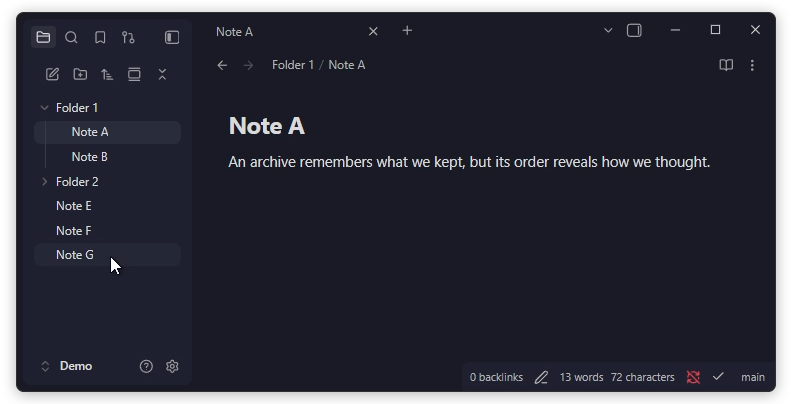
- Custom sorting: manually arrange items via drag-and-drop
- Per-folder sorting: use a different sorting mode for each folder
- Pinning: keep important files at the top
- Hiding: hide irrelevant files manually or by pattern
- Mobile support: works the same way on mobile
- Via the Obsidian Community: https://community.obsidian.md/plugins/flexplorer
- Using the BRAT plugin:
Add Beta Plugin→kh4f/flexplorer - Manually: download
manifest.json,main.js,styles.cssintovault/.obsidian/plugins/flexplorer/
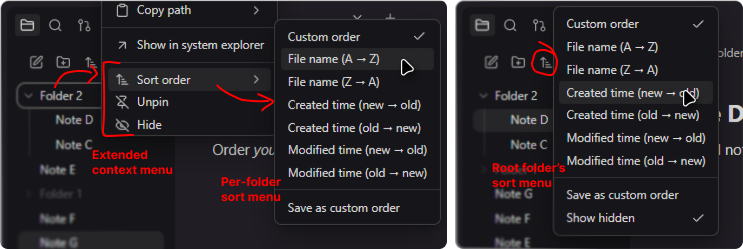
- Per-folder sorting: for regular folders, select
Sort orderfrom the context menu. For the root folder, use theChange sort orderbutton at the top of the file explorer. - Custom sorting: select
Custom orderfor the folder, then drag and drop items to rearrange them. On touch devices, long-press an item first. - Pinning: select
Pin/Unpinfrom an item's context menu. - Hiding: select
Hide/Unhidefrom an item's context menu, or configureHide patternsin the plugin settings. To reveal all hidden items, selectShow hiddenfrom the root folder's sort menu.
- Inspiration: Obsidian Bartender, Custom File Explorer sorting, File Explorer++
- Code contributions: @Mara-Li, @michalgregor, @MichalNawrocik
- Bug reports & feature requests: @AE-SAY-WAY, @Mara-Li, @Azmoinal, @Anonym0usPlayer, @Zweikeks, @SublimePeace, @MinYu5263, @73mtq, @RainyGrass, @elfmedy, @clarenceehsu, @toya-co, @Succubyte, @akshatg, and others