
HunterX is not merely a vulnerability scanner. It is an open-source, AI-assisted offensive security engine for planning and running authorized security-assessment missions. It combines reconnaissance, security-tool orchestration, AI-assisted reasoning, hypothesis-driven investigation, vulnerability validation, evidence collection, proof / PoC engineering, replay / reproducibility, correlation, impact assessment and professional reporting into a single workflow.














Less noise. More verified findings.
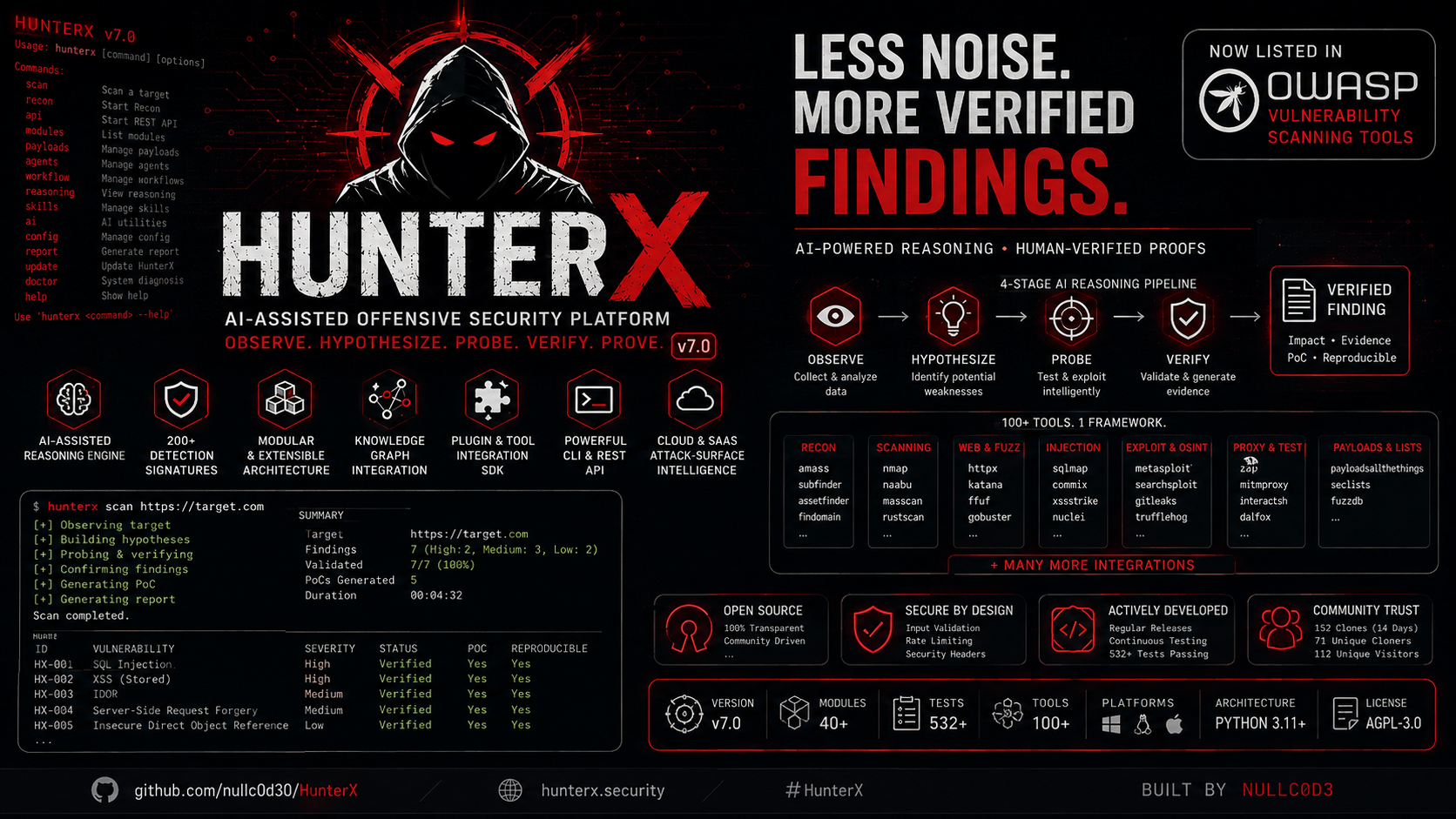
The core message. HunterX does not stop at finding a possible vulnerability. It is built to investigate the hypothesis, validate the behavior, prove the finding, reproduce the evidence, assess the impact, and turn the result into a report-ready security finding.
Vulnerability
+ Evidence
+ Reproducibility
+ Proof / PoC
+ Impact
================
Validated Finding
Responsible use. HunterX is an authorized cybersecurity testing and research platform. You are responsible for obtaining appropriate authorization before testing any system. The author is not responsible for misuse, unauthorized access, illegal activity, or damage caused by the software. See Responsible Use and SECURITY.md.
A traditional scanner reports a candidate and stops:
Traditional Scanner

"Possible SQL Injection"
          �
       Finding?
HunterX carries the candidate through the full investigation:
Candidate
   �
Affected Endpoint
   �
Parameter
   �
Observed Behavior
   �
Hypothesis
   �
Verification
   �
Evidence
   �
Minimal Reproducible PoC
   �
PoC Validation
   �
Impact
   �
Report-Ready Finding
"Possible SQL Injection" is only a hypothesis. HunterX is designed to
investigate, validate, prove, reproduce, correlate and report it - not to
surface it as a verdict. Every claim HunterX makes is backed by observations,
evidence, validation, proof, replay records, impact and provenance. A finding
is only REPORT_READY when the reportability contract is satisfied.
A vulnerability detection is not a validated finding. HunterX drives each candidate through a lifecycle:
DETECTED � SUSPECTED � VALIDATING � VALIDATED � PROVEN � CONFIRMED � REPORT_READY
                                            ? FALSE_POSITIVE
                                            ? INCONCLUSIVE
DETECTED/SUSPECTED- a candidate from tool output or reasoning. Not yet validated.VALIDATING/VALIDATED- behavior is tested and compared against the hypothesis.PROVEN- requires a valid, reproducible proof.CONFIRMED- requires the vulnerability-specific proof contract to permit confirmation and the confidence requirements to be met.REPORT_READY- requires evidence, proof, a reproducible PoC, impact, confidence, scope, timestamp and provenance.FALSE_POSITIVE- requires evidence that the original hypothesis was incorrect.INCONCLUSIVE- the outcome could not be determined (target changed, preconditions changed, WAF behavior changed, network instability, failed tool run or insufficient evidence).
A PoC that fails is never automatically a false positive. The engine
distinguishes FALSE_POSITIVE from INCONCLUSIVE deliberately.
HunterX orchestrates the complete assessment workflow rather than attempting to replace the security-tool ecosystem:
DISCOVER
    �
FINGERPRINT
    �
REASON
    �
HYPOTHESIZE
    �
PROBE
    �
VERIFY
    �
PROVE
    �
POC
    �
REPLAY
    �
CORRELATE
    �
REPORT
| Phase | Purpose |
|---|---|
| DISCOVER | Surface the attack surface - assets, services, endpoints. |
| FINGERPRINT | Identify technologies, versions and exposure. |
| REASON | Generate and prioritize hypotheses with AI-assisted reasoning. |
| HYPOTHESIZE | Turn candidates into testable vulnerability hypotheses. |
| PROBE | Execute targeted checks and tool runs against each hypothesis. |
| VERIFY | Compare observed behavior against expected behavior. |
| PROVE | Require evidence and reproducible proof before a finding advances. |
| POC | Engineer minimal, safe, replayable PoCs. |
| REPLAY | Reproduce the proof deterministically - more than once. |
| CORRELATE | Connect evidence, findings and attack paths across tools and missions. |
| REPORT | Produce professional, evidence-traced reports. |
HunterX orchestrates open-source security tools: it executes them with structured contracts, parses and normalizes their output into canonical observations, correlates results, reasons over hypotheses, validates with evidence, engineers and replays proofs/PoCs, and produces reports. It is built to work with the ecosystem, not to own every security capability itself.
When an AI provider is configured (HUNTERX_AI_PROVIDER), the connected model
is an active participant in the attack loop, not a reporting component. The
loop closes end to end:
OBSERVE � REASON � HYPOTHESIZE � REAL TASK � REAL PROBE � ANALYZE
    � VERIFY � FIND � LEARN � REASON AGAIN � ... � GENUINE EXHAUSTION
- The model receives the attack-surface graph, capability catalog, previous observations, validated findings and disproven hypotheses.
- Every accepted model hypothesis becomes a real assessment task on the attack-surface queue and runs through the ordinary capability execution engine - the same pipeline as every discovery-derived task.
- Attack results and validated findings are fed back into the model's reasoning context; a finding never terminates the mission - it expands the search (adjacent parameters, sibling endpoints, alternative vectors).
- Hypotheses are fingerprinted, so duplicates are recognised while legitimate escalation (a different vector or authentication context) remains possible; disproven hypotheses are learned and never re-run.
- No AI provider is required: without one the mission stays fully deterministic.
A mission is only reported EXHAUSTED when there is genuinely no remaining
work: no unexplored applicable attack surface, no pending capability task, no
pending verification, no validated findings requiring confirmation, no
model-generated attack path, and dynamic discovery exhausted. The following are
never reported as completion - each is recorded with an explicit, distinct
reason:
RESOURCE_LIMIT- a cycle / task / model-call / timeout ceiling prevented exhaustion.MODEL_UNAVAILABLE- the connected model failed, timed out or returned invalid output; HunterX never fabricates hypotheses or findings and never silently marks the surface exhausted.BLOCKED/TARGET_UNAVAILABLE- a persistently defensive or unreachable target is never converted into success.FAILED/PARTIAL- tool failures and partial discovery are explicit and the mission continues with the available surfaces.
Defensive responses (429 / 403 / 5xx / connection resets) throttle the adaptive controller, which recovers and resumes - throttling is never exhaustion.
HunterX v7.1.0 (2026-08-24) is the current release. It assembles these capability areas into one platform:
- Reconnaissance
- Asset discovery
- Fingerprinting
- Target intelligence
- Cloud / SaaS attack-surface intelligence
- AI-assisted reasoning
- Hypothesis generation
- Adaptive mission planning
- Attack-path analysis
- Explainable next-best-action selection
- Vulnerability validation
- Evidence collection
- Proof contracts
- PoC engineering
- Replay / reproducibility
- Impact assessment
- Cross-tool correlation
- Knowledge graph
- Evidence chains
- Topology
- Mission history
- Findings & evidence bundles
- Remediation & retesting
- Markdown � HTML � JSON � SARIF 2.1 � PDF � evidence packages
Platform capabilities - autonomous mission orchestration and adaptive
planning (hunterx mission, hunterx hunt); a Tool Integration SDK and
tool-intelligence platform with a 92-tool arsenal manifest; persistent target
intelligence (TIDB) with Alembic migrations, events, audit and versioning;
topology and a typed event bus; knowledge-graph correlation; the Vulnerability
Proof & PoC Validation Engine; professional multi-format reporting; security
hardening (scope and authorization guards, sandboxing, evidence-gated
confidence, secret masking, hardened XML parsing); an idempotent install.sh
installer, Docker image and PyPI packaging; CI/CD pipelines; and comprehensive
v7 documentation.
HunterX treats proof as part of vulnerability validation. The proof engine transforms a validated hypothesis into a report-ready finding:
HYPOTHESIS
    �
PROOF CONTRACT
    �
REQUIRED EVIDENCE
    �
MINIMAL PROOF STRATEGY
    �
PROOF CONSTRUCTION
    �
SAFETY VALIDATION
    �
SCOPE VALIDATION
    �
EXECUTION
    �
REPLAY
    �
EVIDENCE EVALUATION
    �
IMPACT
    �
CONFIDENCE
    �
VALIDATED FINDING
    �
REPRODUCTION PACKAGE
    �
REPORT
Two distinctions are fundamental:
GENERATED ? VALIDATED
EXECUTED ? VALIDATED
Generating a PoC proves nothing. Executing it once proves nothing. A finding
is only PROVEN / CONFIRMED / REPORT_READY when its evidence, proof and
reproducibility requirements are actually satisfied.
- Proof contracts - every supported vulnerability class has a deterministic
contract defining preconditions, allowed and forbidden actions, required
evidence, expected behavior, replay and impact requirements. Classes include
SQL/NoSQL injection, XSS, SSRF, path traversal/LFI, IDOR, authentication,
authorization, SSTI, XXE, command-injection indicators, cloud exposure and
UNKNOWN_BEHAVIOR. - Minimal, safe proofs - PoCs are structured artifacts (request templates, differential tests, configuration snapshots), never arbitrary executable scripts. Inputs are bounded, forbidden markers are refused, secrets are redacted, and every PoC is immutable with lineage.
- Replay & reproducibility - proofs are replayed deterministically with a
SUCCESS/FAILED/INCONCLUSIVE/BLOCKEDverdict.REPRODUCIBLErequires repeated successful replays - never a single run. A single "executed once" is never "reproducible". - Evidence-driven impact & confidence - impact is classified strictly from
captured evidence, never inferred merely from the vulnerability class.
Confidence is a versioned, weighted policy over named factors - never a
universal percentage.
CONFIRMEDcan never be reached unless the proof contract permits confirmation. - Novel / unknown behavior - unknown behaviors follow a hypothesis-driven
loop (
Unknown Behavior � Hypothesis � Experiment � Unexpected Result � New Hypothesis � Minimal Proof � Validated Behavior) and remain candidates until sufficient evidence exists. HunterX supports hypothesis-driven investigation of unknown or application-specific behaviors; it does not claim guaranteed autonomous discovery of zero-days. - RCE, responsibly - where applicable, proof emphasizes minimal-impact demonstration, evidence of execution and reproducibility - not destructive commands.
The engine is not a weaponization engine. Data destruction, persistence, credential dumping, reverse shells, lateral movement, DoS, mass data extraction and unrestricted database extraction are never scheduled. Proof means demonstrating the vulnerability with the minimum necessary interaction and impact.
HunterX supports vulnerability discovery, validation and proof across a broad set of classes, as supported by its proof-contract registry:
| SQL Injection | NoSQL Injection | XSS | |
| SSRF | Path Traversal / LFI | RCE / Command Injection Indicators | |
| IDOR / BOLA | SSTI | XXE | |
| Authentication | Authorization | API | |
| GraphQL | Open Redirect | CORS | |
| Sensitive Information Exposure | Security Misconfiguration | Known Vulnerable Components | |
| Dependency Vulnerabilities | Cloud Exposure | UNKNOWN_BEHAVIOR |
Validation depth is defined per class by the proof-contract registry - not every class has identical validation depth, and HunterX never claims otherwise. See PoC & Validation for the full contract model.
INSTALL � TOOLS READY � HUNT � INSPECT � VALIDATE � REPORT
HunterX v7 organizes work as missions. HunterX integrates external security tools (nmap, subfinder, nuclei, ffuf, ...); those tools are discovered, verified and provisioned before a mission runs. Start with an authorized target:
# 1. INSTALL - Python 3.11+ on Linux, macOS or Windows
pip install hunterxsec
# or from source:  git clone https://github.com/nullc0d30/HunterX.git && cd HunterX
#                  python -m pip install -e ".[api,db,dev]"
# or installer:   curl -sSL https://raw.githubusercontent.com/nullc0d30/HunterX/main/install.sh | sudo bash

# 2. TOOLS READY - establish the base environment and inspect readiness
hunterx install                          # base HunterX environment (detect + verify tools)
hunterx tools check                      # readiness table + capability coverage
hunterx tools audit                      # integration maturity (knowledge + runtime)
hunterx tools install --profile recon    # provision missing tools via trusted methods
hunterx tools install --profile full     # provision the complete external toolchain

# 3. HUNT - plan and start a full-spectrum hunt mission
hunterx hunt full_security_assessment https://example.com

# 4. INSPECT - track the mission and inspect the toolchain
hunterx hunt status <mission_id>
hunterx hunt surface <mission_id>
hunterx tools list
hunterx tools capabilities
hunterx tools health

# 5. VALIDATE - work findings, PoCs and proof replay
hunterx finding list <mission_id>
hunterx finding poc <finding_id>       # PoC engineering
hunterx finding proof <finding_id>     # proof state
hunterx finding replay <finding_id>    # proof replay

# 6. REPORT - generate and export professional reports
hunterx report generate <finding_id>
hunterx report export <report_id> markdown
Verify your install:
hunterx version     # HunterX v7.1.0
hunterx help        # command list
hunterx platform    # platform composition
hunterx config      # resolved configuration
Missions persist to the configured database (SQLite by default), so
hunterx mission create <objective> <target> followed by
hunterx mission start <mission_id> works across CLI invocations.
Every hunterx hunt mission runs a tool-readiness preflight before any
execution:
- Required capabilities with no available tool block the mission with an
explicit
status: blocked, the missing capability names and the missing tools - never a silent zero-execution mission. - Missing optional/recommended tools produce a degraded mission that still runs with reduced coverage.
hunterx tools checkshows per-tool status (AVAILABLE/MISSING/BROKEN/OUTDATED/UNSUPPORTED), detected versions and paths, plus per-capability coverage.
See Tool Readiness and the full CLI Reference for complete usage.
HunterX does not treat every scan as an isolated command. It maintains structured target intelligence that persists and correlates across runs:
assets / targets � observations � findings � evidence
      � history � relationships / topology � mission state
      � cloud intelligence � correlation � tool results
- assets / targets - the surface under assessment
- observations - canonical normalized results from every tool run
- findings - validated results with evidence and proof
- evidence - provenance-backed evidence records
- history - target snapshots, diffs and change detection
- relationships / topology - how assets, services and cloud resources relate
- cloud intelligence - cloud/SaaS attack-surface intelligence
- correlation - cross-tool evidence chains
- mission state - checkpoint/resume and campaign state
- tool results - structured execution records
HunterX v7 includes evidence-backed Cloud & SaaS Attack-Surface Intelligence. Where supported, provider coverage includes AWS, Azure, GCP, OCI, Cloudflare, DigitalOcean, Akamai, Fastly, Vercel, Netlify, Heroku, Render, Fly.io, Supabase, Firebase, Kubernetes and Docker.
It provides provider detection, cloud resource intelligence, exposure classification, environment classification, topology, account/region/resource relationships, SaaS detection, cloud evidence and correlation - built from passive, static evidence (DNS, TLS, HTTP headers, HTML/JS, OpenAPI, documentation) for authorized targets. It never authenticates to cloud accounts, never accesses cloud resources and never retrieves secrets.
HunterX correlates results across tools and missions into a knowledge graph of entities and relationships:
Assets
  �
Services
  �
Observations
  �
Findings
  �
Evidence
  �
Proofs
  �
Attack Paths
This enables cross-scan correlation, attack-path analysis and context-aware reasoning across missions.
The workflow does not end at detection:
Finding
   �
Evidence
   �
Verification
   �
PoC
   �
Reproduction
   �
Impact
   �
Remediation
   �
Report
HunterX turns validated findings into structured, professional reports with verified export formats:
JSON � machine-parsable
Markdown � human-readable
HTML � visual dashboard
SARIF 2.1 � VS Code / GitHub CodeQL integration
PDF   � document export
Evidence Package � bundled evidence (ZIP)
Reports include finding, asset, endpoint, parameter, evidence, verification, PoC, reproduction, impact, confidence, relationships, risk/context, and remediation/recommendations where supported. Every statement traces to observation, evidence, validation, proof, impact, tool result, target intelligence or explicit analyst reasoning.
Requirements: Python 3.11+ on Linux, macOS or Windows.
# Installer script (Linux/macOS)
curl -sSL https://raw.githubusercontent.com/nullc0d30/HunterX/main/install.sh | sudo bash

# From PyPI - https://pypi.org/project/hunterxsec/
python -m pip install hunterxsec

# Or from source
git clone https://github.com/nullc0d30/HunterX.git
cd HunterX
python -m pip install -e ".[api,db,dev]"
Name note. The GitHub repository nullc0d30/HunterX is the canonical home of HunterX, created and maintained by Ahmed Awad (AKA NullC0d3). The HunterX v7 distribution is published to PyPI as
hunterxsec; the plainhunterxname on PyPI belongs to a different, unrelated project. The import package and CLI command arehunterxeither way.
Verify your install with hunterx version (see Quick Start).
See Installation for details, including database
initialization (alembic upgrade head) and Docker.
HunterX works without an AI API key. If you configure nothing, HunterX runs
normally using a safe NullAIClient fallback; AI-dependent operations simply
report that no AI provider is configured when invoked.
To enable AI-assisted reasoning:
- Copy the template:
cp .env.example .env - Set
HUNTERX_AI_PROVIDERto your provider - Set
HUNTERX_AI_MODELto the model you want - Set the matching
HUNTERX_AI_<PROVIDER>_KEY - Run HunterX
.env.example is a template. .env is your private, local configuration file
that holds your real API key. It is already ignored by Git and must never be
committed. Never paste API keys into source files, GitHub issues, pull
requests, screenshots, logs, or public documentation.
HunterX ships a runtime adapter for every provider its configuration layer recognizes. Provider and model are selected independently:
| Provider | HUNTERX_AI_PROVIDER |
HUNTERX_AI_MODEL (example) |
API key variable | Base URL |
|---|---|---|---|---|
| OpenAI | openai |
gpt-4o-mini |
HUNTERX_AI_OPENAI_KEY |
https://api.openai.com/v1 |
| Anthropic / Claude | anthropic |
claude-3-5-sonnet-latest |
HUNTERX_AI_ANTHROPIC_KEY |
https://api.anthropic.com/v1 |
| DeepSeek | deepseek |
deepseek-chat |
HUNTERX_AI_DEEPSEEK_KEY |
https://api.deepseek.com/v1 |
| OpenRouter | openrouter |
deepseek/deepseek-chat |
HUNTERX_AI_OPENROUTER_KEY |
https://openrouter.ai/api/v1 |
| Google Gemini | gemini |
gemini-1.5-flash |
HUNTERX_AI_GEMINI_KEY |
https://generativelanguage.googleapis.com/v1beta |
| xAI / Grok | grok |
grok-2-latest |
HUNTERX_AI_GROK_KEY |
https://api.x.ai/v1 |
| LM Studio | lmstudio |
qwen2.5-coder-7b |
HUNTERX_AI_LMSTUDIO_KEY |
http://127.0.0.1:1234/v1 |
| Ollama | ollama |
llama3.1 |
HUNTERX_AI_OLLAMA_KEY |
http://127.0.0.1:11434/v1 |
| Requesty | openai_compatible |
anthropic/claude-3.5-sonnet |
HUNTERX_AI_OPENAI_COMPATIBLE_KEY |
https://router.requesty.ai/v1 |
| Generic OpenAI-compatible | openai_compatible |
model-name |
HUNTERX_AI_OPENAI_COMPATIBLE_KEY |
custom |
Example - OpenRouter:
HUNTERX_AI_PROVIDER=openrouter
HUNTERX_AI_MODEL=deepseek/deepseek-chat
HUNTERX_AI_OPENROUTER_KEY=YOUR_API_KEY
Example - LM Studio (local):
HUNTERX_AI_PROVIDER=lmstudio
HUNTERX_AI_MODEL=qwen2.5-coder-7b
HUNTERX_AI_BASE_URL=http://127.0.0.1:1234/v1
HUNTERX_AI_LMSTUDIO_KEY=
Example - Ollama (local):
HUNTERX_AI_PROVIDER=ollama
HUNTERX_AI_MODEL=llama3.1
HUNTERX_AI_BASE_URL=http://127.0.0.1:11434/v1
HUNTERX_AI_OLLAMA_KEY=
Example - Requesty:
HUNTERX_AI_PROVIDER=openai_compatible
HUNTERX_AI_BASE_URL=https://router.requesty.ai/v1
HUNTERX_AI_MODEL=anthropic/claude-3.5-sonnet
HUNTERX_AI_OPENAI_COMPATIBLE_KEY=YOUR_REQUESTY_KEY
Example - Generic OpenAI-compatible:
HUNTERX_AI_PROVIDER=openai_compatible
HUNTERX_AI_BASE_URL=http://your-endpoint:PORT/v1
HUNTERX_AI_MODEL=model-name
HUNTERX_AI_OPENAI_COMPATIBLE_KEY=YOUR_KEY-
HUNTERX_AI_PROVIDER- where the API request is sent. Selectingopenaisends requests toapi.openai.com,deepseektoapi.deepseek.com,openroutertoopenrouter.ai,lmstudioto127.0.0.1:1234,ollamato127.0.0.1:11434,openai_compatibleto your custom base URL. HunterX never silently reroutes one provider to another. -
HUNTERX_AI_MODEL- the model identifier HunterX asks the provider to use. It is passed through verbatim and never silently rewritten. -
The matching
HUNTERX_AI_<PROVIDER>_KEY- the secret credential for that provider. A provider without its key reports a clear configuration error; an invalid key, invalid model, rate limit or outage is reported truthfully. AI failure never stops a mission - advisory suggestions degrade to "no suggestion" and the deterministic planner continues. -
HUNTERX_AI_BASE_URL- override the default base URL for OpenAI-compatible providers (LM Studio, Ollama, custom). Not used by OpenAI, Anthropic, etc. -
HUNTERX_AI_TIMEOUT- per-request timeout in seconds (default: 120.0). -
For local providers (LM Studio, Ollama), the API key is optional and can be left empty.
-
For generic
openai_compatible, the API key is required if the endpoint requires authentication.
Live completion vs. routing. Every provider route is implemented and unit-tested with mocked HTTP. Live completion requires your own API credential for the selected provider; without one the provider is not exercised live. HunterX never silently reroutes one provider to another.
Verify the setup with hunterx config (the API key is masked), then run your
missions normally.
With Docker, supply the same values at runtime - never bake .env into the
image:
docker run --rm --env-file .env nullc0d30/hunterx:latest configSecurity: Never commit your
.envfile or expose API keys in source code, GitHub issues, pull requests, screenshots, logs, or public documentation. Use environment variables or runtime secret injection in CI/CD and container environments.
Full setup, provider reference, troubleshooting and Docker usage: AI Configuration � GitHub Pages
HunterX supports local AI models via LM Studio and Ollama. These run entirely on your machine - no data leaves your machine, no API costs, and no rate limits.
- Download from lmstudio.ai
- Load a model (e.g.,
qwen2.5-coder-7b,deepseek-coder-6.7b,llama3.1) - Click "Start Server" (defaults to
http://127.0.0.1:1234/v1) - Configure:
HUNTERX_AI_PROVIDER=lmstudio
HUNTERX_AI_BASE_URL=http://127.0.0.1:1234/v1
HUNTERX_AI_MODEL=qwen2.5-coder-7b
HUNTERX_AI_LMSTUDIO_KEY=- Install from ollama.com
- Pull a model:
ollama pull llama3.1orollama pull qwen2.5-coder:7b - Ollama server starts automatically on
http://127.0.0.1:11434 - Configure:
HUNTERX_AI_PROVIDER=ollama
HUNTERX_AI_BASE_URL=http://127.0.0.1:11434/v1
HUNTERX_AI_MODEL=llama3.1
HUNTERX_AI_OLLAMA_KEY=HUNTERX_AI_PROVIDER=openai_compatible
HUNTERX_AI_BASE_URL=https://router.requesty.ai/v1
HUNTERX_AI_MODEL=anthropic/claude-3.5-sonnet
HUNTERX_AI_OPENAI_COMPATIBLE_KEY=your-requesty-keyHUNTERX_AI_PROVIDER=openai_compatible
HUNTERX_AI_BASE_URL=http://your-endpoint:PORT/v1
HUNTERX_AI_MODEL=model-name
HUNTERX_AI_OPENAI_COMPATIBLE_KEY=your-keyNote: For LM Studio and Ollama, the API key is optional (can be left empty). For generic
openai_compatible, the API key is required if the endpoint requires authentication.
Health check: Run
hunterx ai checkto verify connectivity and model availability before starting a mission.
HunterX supports automatic provider failover with priority-based failover:
# Priority 1: Primary (OpenRouter)
HUNTERX_AI_PROVIDER=openrouter
HUNTERX_AI_MODEL=deepseek/deepseek-chat
HUNTERX_AI_OPENROUTER_KEY=sk-or-...

# Priority 2: Local fallback (LM Studio)
HUNTERX_AI_PROVIDER=lmstudio
HUNTERX_AI_BASE_URL=http://127.0.0.1:1234/v1
HUNTERX_AI_MODEL=qwen2.5-coder-7b
HUNTERX_AI_LMSTUDIO_KEY=

# Priority 3: Local fallback (Ollama)
HUNTERX_AI_PROVIDER=ollama
HUNTERX_AI_BASE_URL=http://127.0.0.1:11434/v1
HUNTERX_AI_MODEL=llama3.1
HUNTERX_AI_OLLAMA_KEY=

# Priority 4: Deterministic fallback (no AI)
# Automatic - no configuration needed
The ProviderManager handles automatic failover:
- Rate limited (429) -> cooldown with exponential backoff + jitter -> failover to next provider
- Connection refused / timeout -> immediate failover to next provider
- Authentication failure -> long cooldown, failover to next provider
- Model not found (404) -> immediate failover
- Provider error (5xx) -> failover with backoff
The mission continues with deterministic fallback when all AI providers are
exhausted. AI unavailability produces DEGRADED status, not BLOCKED.
# Health check
hunterx ai check
# Output:
# AI Provider: lmstudio
# Model: qwen2.5-coder-7b
# Base URL: http://127.0.0.1:1234/v1
# Status: AVAILABLE
# Health check: OK

# List available models
hunterx ai models
# Output:
# AI Provider: lmstudio
# Model: qwen2.5-coder-7b (by qwen)
# ...

# Show provider status and configuration
hunterx ai status
# Output:
# AI Provider: lmstudio
# Model: qwen2.5-coder-7b
# Base URL: http://127.0.0.1:1234/v1
# Status: AVAILABLE
# Timeout: 120sThe ProviderManager supports a prioritized chain of providers. Configuration is via environment variables with numeric priority:
# Priority 1 (highest): Primary cloud provider
HUNTERX_AI_PROVIDER_1=openrouter
HUNTERX_AI_MODEL_1=deepseek/deepseek-chat
HUNTERX_AI_OPENROUTER_KEY=sk-or-...
HUNTERX_AI_PRIORITY_1=1

# Priority 2: Local LM Studio
HUNTERX_AI_PROVIDER_2=lmstudio
HUNTERX_AI_MODEL_2=qwen2.5-coder-7b
HUNTERX_AI_BASE_URL_2=http://127.0.0.1:1234/v1
HUNTERX_AI_LMSTUDIO_KEY_2=
HUNTERX_AI_PRIORITY_2=2

# Priority 3: Local Ollama
HUNTERX_AI_PROVIDER_3=ollama
HUNTERX_AI_MODEL_3=llama3.1
HUNTERX_AI_BASE_URL_3=http://127.0.0.1:11434/v1
HUNTERX_AI_OLLAMA_KEY_3=
HUNTERX_AI_PRIORITY_3=3

# Priority 4: Generic OpenAI-compatible (e.g., Requesty)
HUNTERX_AI_PROVIDER_4=openai_compatible
HUNTERX_AI_BASE_URL_4=https://router.requesty.ai/v1
HUNTERX_AI_MODEL_4=anthropic/claude-3.5-sonnet
HUNTERX_AI_OPENAI_COMPATIBLE_KEY_4=...
HUNTERX_AI_PRIORITY_4=4
The ProviderManager automatically sorts by priority and fails over
sequentially. Use hunterx ai status to see current provider status.
| Variable | Description | Required | Default |
|---|---|---|---|
HUNTERX_AI_PROVIDER |
Provider name | Yes | (empty = disabled) |
HUNTERX_AI_MODEL |
Model identifier | Yes (if provider set) | - |
HUNTERX_AI_BASE_URL |
Override base URL | For local/custom | Provider default |
HUNTERX_AI_TIMEOUT |
Request timeout (seconds) | No | 120.0 |
HUNTERX_AI_<PROVIDER>_KEY |
API key | For cloud providers | - |
HUNTERX_AI_TIMEOUT |
Request timeout (seconds) | No | 120.0 |
| Provider | Provider ID | Default Base URL | API Key Var | Local? |
|---|---|---|---|---|
| OpenAI | openai |
https://api.openai.com/v1 |
HUNTERX_AI_OPENAI_KEY |
No |
| Anthropic | anthropic |
https://api.anthropic.com/v1 |
HUNTERX_AI_ANTHROPIC_KEY |
No |
| DeepSeek | deepseek |
https://api.deepseek.com/v1 |
HUNTERX_AI_DEEPSEEK_KEY |
No |
| OpenRouter | openrouter |
https://openrouter.ai/api/v1 |
HUNTERX_AI_OPENROUTER_KEY |
No |
| Google Gemini | gemini |
https://generativelanguage.googleapis.com/v1beta |
HUNTERX_AI_GEMINI_KEY |
No |
| xAI / Grok | grok |
https://api.x.ai/v1 |
HUNTERX_AI_GROK_KEY |
No |
| LM Studio | lmstudio |
http://127.0.0.1:1234/v1 |
HUNTERX_AI_LMSTUDIO_KEY |
Yes |
| Ollama | ollama |
http://127.0.0.1:11434/v1 |
HUNTERX_AI_OLLAMA_KEY |
Yes |
| Requesty | openai_compatible |
https://router.requesty.ai/v1 |
HUNTERX_AI_OPENAI_COMPATIBLE_KEY |
No |
| Generic OpenAI-compat | openai_compatible |
custom | HUNTERX_AI_OPENAI_COMPATIBLE_KEY |
Optional |
# Health check - verify provider connectivity and model availability
hunterx ai check

# List available models from the configured provider
hunterx ai models

# Show detailed provider status and configuration
hunterx ai statusHunterX classifies AI failures into deterministic categories for telemetry and failover decisions:
| Category | Description | Triggers Failover |
|---|---|---|
rate_limited |
HTTP 429 / rate limit headers | Yes |
timeout |
Request timeout | Yes |
connection_refused |
Connection refused / host unreachable | Yes |
connection_error |
Network / DNS / SSL errors | Yes |
authentication_error |
HTTP 401/403 | Yes |
model_unavailable |
HTTP 404 / model not found | Yes |
authentication_required |
HTTP 402 / payment required | Yes |
invalid_response |
Malformed / non-JSON response | No |
provider_error |
HTTP 5xx | Yes |
unknown |
Unclassified error | No |
Telemetry includes ai_failure_category for every AI interaction.
The mission preflight now includes AI provider health verification:
hunterx hunt full_security_assessment https://example.comPreflight output includes:
AI Provider: lmstudio
Model: qwen2.5-coder-7b
Base URL: http://127.0.0.1:1234/v1
Status: AVAILABLE
Health check: OK
If the AI provider is unavailable:
AI Provider: openrouter
Model: deepseek/deepseek-chat
Base URL: https://openrouter.ai/api/v1
Status: UNAVAILABLE
Error: rate limited (HTTP 429)
The mission continues in deterministic mode with DEGRADED status - it never
stops due to AI unavailability unless the mission explicitly requires AI.
New telemetry fields for AI observability:
ai_failure_category- classified failure category for every AI interactionhypotheses_resolved- count of hypotheses in terminal states (VALIDATED/DISPROVED/REFUTED)hypotheses_open- count of actionable hypotheses (PROPOSED/SUPPORTED/WEAKLY_SUPPORTED/INCONCLUSIVE/NOVEL_BEHAVIOR)hypotheses_deferred/hypotheses_blocked- classified non-actionable hypotheses
Mission outcome now includes:
{
  "hypotheses_resolved": 9,
  "hypotheses_deferred": 167,
  "hypotheses_open": 0,
  "ai_unavailable": true,
  "ai_provider": "openrouter",
  "ai_fallbacks": 12
}The .env.example file has been updated with all new provider configurations.
Copy it to .env and customize:
cp .env.example .env
# Edit .env with your provider settingsSee the updated .env.example for the complete template with
all provider configurations and comments.
| Model | Quantization | Size | RAM | Notes |
|---|---|---|---|---|
qwen2.5-coder-7b |
4-bit | ~4 GB | ~6 GB | Recommended |
deepseek-coder-6.7b |
4-bit | ~4 GB | ~6 GB | Good alternative |
codellama-7b |
4-bit | ~4 GB | ~6 GB | Good generalist |
llama3.1 |
4-bit | ~4.5 GB | ~7 GB | Good generalist |
codellama-7b |
8-bit | ~7 GB | ~9 GB | May be slow on 2GB VRAM |
Recommendation: Use 4-bit quantized 7B models - they fit in system RAM and offload to CPU. LM Studio and Ollama handle CPU offload automatically. GPU acceleration is optional but recommended if available (RX 630 has only 2GB VRAM).
The tool ecosystem documentation has been updated with the new AI providers. See Tool Ecosystem for the complete list including new AI provider entries.
If upgrading from v7.0.x to v7.1.0:
- Update
.envwith new provider configuration format - Run
hunterx ai checkto verify provider connectivity - Run
hunterx ai modelsto verify model availability - Check preflight with
hunterx hunt full_security_assessment <target> - Review telemetry - new fields:
hypotheses_resolved,hypotheses_open,ai_failure_category
No breaking changes to existing configurations - all v7.0.x configurations continue to work with OpenRouter, OpenAI, Anthropic, DeepSeek, Gemini, Grok.
- AI Configuration
- AI Provider Failover
- Local Models
- Preflight
- CLI Reference
- Telemetry
- v7.1.0 Release Notes
All changes verified:
- 93 tests pass
- Ruff clean
- No regressions in existing functionality
- New integration tests for provider failover
- Regression tests for cycle ceiling, hypothesis lifecycle, AI failover