

Say no to agent “swarms”.
Deploy deterministic, verifiable, programmable agentic workflows.



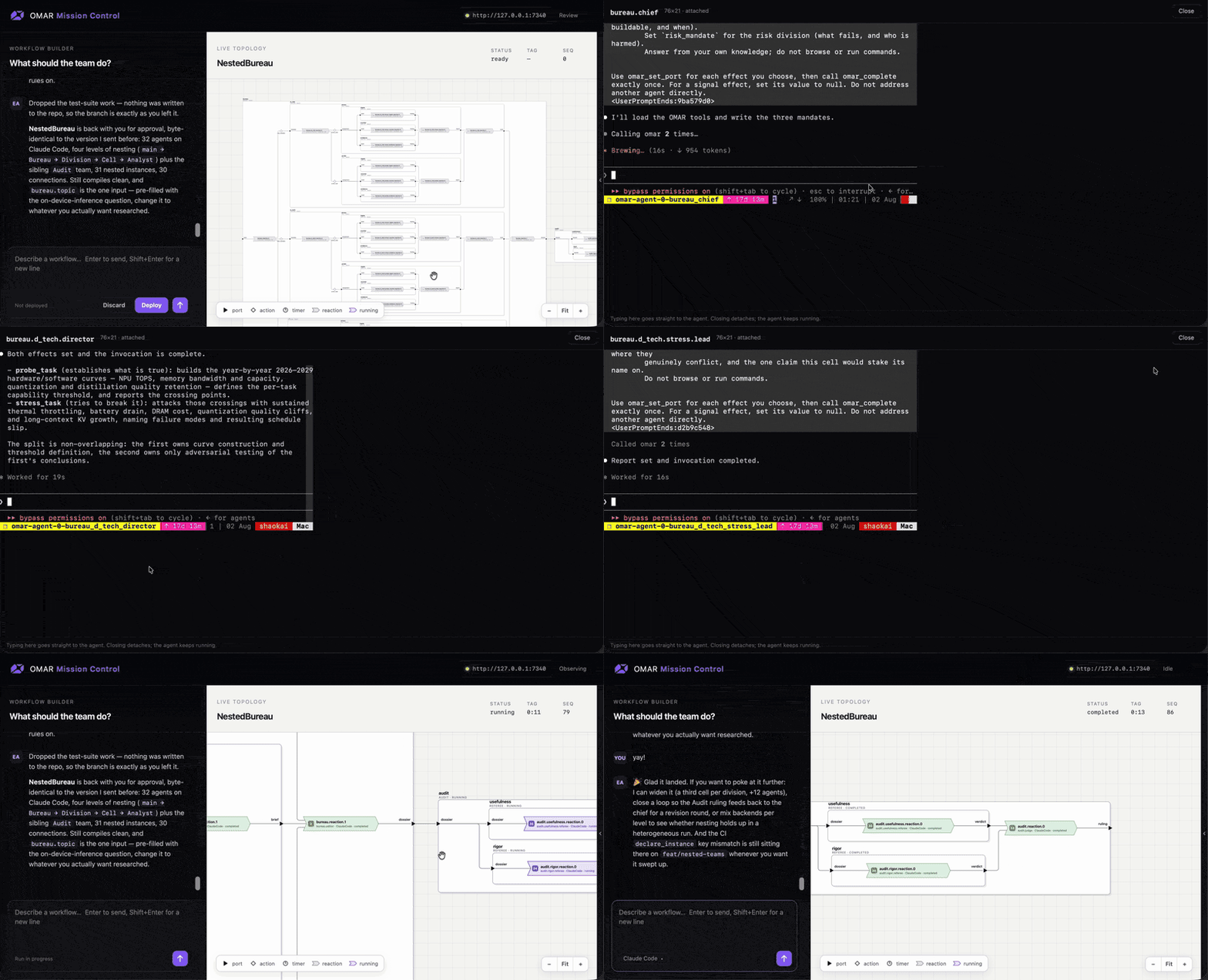
OMAR (Open Multi-Agent Runtime) coordinates coding agents through programmable workflows. Describe a task in Mission Control, review the team diagram, and deploy it with live visibility and terminal access. Compiled .omar programs define typed inputs, outputs, and handoffs with deterministic scheduling; model responses and tool actions can still vary. See the language specification.
-
📜 Explicit coordination contracts: Declare typed inputs and outputs, triggers, and permitted output writes. OMAR provides system-level determinism for scheduling and handoffs, with compiler validation and runtime enforcement of output contracts.
-
🤝 Mixed agent teams: Put Claude Code, Codex, Cursor, OpenCode, Antigravity, and Pi in the same workflow. Choose a backend for each role using the supported agent backends.
-
🪆 Teams within teams: Compose reusable, parameterized teams into deeper hierarchies. Build pipelines, parallel branches, and feedback loops with explicit connections between them.
-
🔎 Live visibility and direct access: Follow execution status and values in Mission Control's live diagram. Open an individual agent's terminal to inspect its session and interact directly.
-
🧠 Model heterogeneity: Combine fast System I models such as Jev with System II reasoning models in the same workflow.
-
⏯️ Checkpointed workflows: Pause and resume workflows at well-defined checkpoints between logical tags.
-
🛠️ Flexible sessions and familiar tools: Run long-lived or task-specific agents, with terminal access and the
tmuxcontrols you already use.
- tmux 3.0+
- Git (for team-instance workspaces and file snapshots)
- Rust 1.89+
- GNU Make
- Node.js 22.13+ (to build Mission Control, which
make buildembeds) - elan (to build
omarc, whichmake installinstalls alongsideomar) - One or more coding agents listed here.
curl -fsSL https://omar.rs/install.sh | shInstalls all binaries to /usr/local/bin.
brew install omar-os/omar/omarRequires Rust 1.89+, GNU Make, and elan.
git clone https://github.com/omar-os/omar.git
cd omar && make install$ omar up -s dev
$ omar attach -s dev --webStarts an independent background runtime, then opens its web UI. Closing the
browser leaves the runtime and its topologies running. Stop it with omar down -s dev.
omar --help lists the session commands.
Type what the team should do. For example:
Create a team that drafts and reviews a technical design. Use Claude Code to write a proposal from my brief, then pass it to Codex to review the tradeoffs and missing requirements. Send both the proposal and review to me for a final decision in Mission Control.
The assistant drafts an OMAR program and shows you the team diagram it compiles to. Inspect the roles and handoffs, then press Confirm deploy to start the workflow. The diagram goes live as agents work and pass results between steps. This example requires both Claude Code and Codex to be installed and configured.
| Command | What it does |
|---|---|
omar up -s dev |
Start a background session, or restart the stopped session named dev. |
omar up --port 34223 |
Pick the session's port. Always on 127.0.0.1; reach it remotely through an SSH tunnel. Kept across restarts. |
omar up --view-address 0.0.0.0:8080 |
Also serve a read-only Mission Control: conversations, live diagram, terminals; no writes, no credential. IP picks who can watch: 127.0.0.1 this machine, one of its IPs (e.g. 10.0.1.5) whoever reaches that IP, 0.0.0.0 every interface. |
omar attach -s dev --web |
Open Mission Control for that session. Use --tui for the terminal UI. |
omar down -s dev |
Stop the session and keep its state. |
omar rm -s dev |
Remove the session and its state, stopping it first if running. |
Closing the browser or detaching leaves the session running. Use omar --help
for more commands and omar <command> --help for options.
Note: The terminal UI does not yet implement the deterministic model in the mission control.
$ omar up --tuiOr attach to a running session with omar attach -s <session> --tui. z
detaches and the runtime keeps every workload running; Q stops the session.
D asks for confirmation, then deletes the selected EA and its agents. The
runtime and other EAs keep running; the final EA cannot be deleted. Detach
terminals attached to that EA's agents before confirming deletion.
Go here to see how to launch with specific agent backends.
Copy the following into the EA window:
Run https://github.com/omar-os/omar/blob/main/prompts/tests/project-factory.md
You should see agents being spawned by the EA.
Tip: Use ↑↓←→ to cycle through agents at the current level. Use Tab to drill into a deeper level. Use Shift+Tab to back out.
Go back to the EA and type in:
Shutdown the test project and its agents.
| Backend | How to launch |
|---|---|
| Claude Code | omar -a claude up (default) |
| Codex CLI | omar -a codex up |
| Cursor CLI | omar -a cursor up |
| Opencode | omar -a opencode up |
| Google Antigravity CLI | omar -a agy up |
| Pi | omar -a pi up |
Each omar -a <backend> up starts a new independent session. Add -s dev
to name it, and --web or --tui to open a client immediately.
BSD 3-Clause
Thanks to all of our amazing contributors!
OMAR is made with ❤️ in Berkeley, CA.