

- Get started
- Background
- EU Digital Identity Ecosystem
- Interoperability and conformance
- Standards and technologies
- Support
- License
The Procivis One Core is a robust solution capable of powering every element of the digital identity credential lifecycle, flexibly handling a broad array of different protocols and trust models, ensuring compatibility with different digital identity regulations, and can be installed and operated almost anywhere, ensuring seamless integration through a powerful API.
Procivis One is built to connect your organization to the SSI ecosystem, become compatible with regulations such as eIDAS 2.0, and be extensible as new regulations and requirements emerge.
See the key features and complete solution architecture.
- Rust - Install via rustup.rs. See
rust-versioninCargo.tomlfor the minimum required version. Any stable release at or above that works fine. - Docker with Docker Compose - Docker Desktop recommended for easiest setup.
- cargo-make:
cargo install cargo-make - cargo-nextest, the test runner:
cargo install cargo-nextest --locked(themakerstest tasks install it on first use)
-
Verify Docker is running:
docker compose version -
Compile the project:
makers build -
Start the database:
makers dbstart -
Start the server:
makers run -
Open http://localhost:3000/swagger-ui/index.html You should see the Swagger UI interface
-
Click the green "Authorize" button and set the authorization bearer token:
test
→ You can now make API calls directly to the server using the Swagger UI interface
What's running:
- Database: running in Docker
- API server: http://localhost:3000
- Swagger UI: http://localhost:3000/swagger-ui/index.html
See Getting Started with Credentials on the docs. This guide walks you through creating your first organizations and a complete issuance, presentation, and verification flow.
- Issues compiling - check
rustc --versionand runrustup updateif your version is below the version specified inCargo.toml. - Issues starting the database - make sure Docker is running.
- Mac: you should see the whale icon in your menu bar.
- Windows: you should see the whale icon in your system tray.
- Issues making API calls - make sure you have added the authorization
bearer token
testto the swagger.- If you still have issues with calls, check the value of
app.authTokeninconfig/config-local.ymlas this determines your authorization token.
- If you still have issues with calls, check the value of
Values set in dev.env will override the configuration files found
in /config.
- Set a new server authorization token:
ONE_app__authToken=yourTokenHere - Provide new encryption tokens for OpenID4VCI and private keys (default
configuration has placeholder values allowing the server to start):
ONE_issuanceProtocol__OPENID4VCI_FINAL1__params__private__encryption=yourTokenHereONE_issuanceProtocol__OPENID4VCI_FINAL1_HAIP__params__private__encryption=yourTokenHereONE_issuanceProtocol__OPENID4VCI_FINAL1_SWIYU__params__private__encryption=yourTokenHereONE_keyStorage__INTERNAL__params__private__encryption=yourTokenHere
Encryption keys must be a 32 byte hex-encoded value. Use
openssl rand -hex 32 or another qualified tool to generate a
cryptographically-secure key.
For more, see Operations.
You can use the full enterprise stack when you join our Trial Environment. Here you are given control of an organization in the Procivis One Desk UI.
Tests run with nextest: one process per test, tests run in parallel, and a hung test is killed after 5 minutes. The database tests on MariaDB and Postgres need nextest: every test reuses the database of its nextest slot, emptied before each test.
To run only the unit tests
cargo nextest run --workspace --lib
# or
makers unit-tests
To run integration-tests
cargo nextest run --workspace --test integration_tests
# or
makers integration-tests
To run the database tests on MariaDB and Postgres at the same time
makers dbstart && makers dbstart_postgres
makers test-db
The test databases stay on the containers between runs. makers test-db-clean
drops them all.
To run everything, including the doctests that nextest skips
makers test
makers doc-tests
To run integration-tests with MariaDB
makers dbstart
ONE_app__databaseUrl="mysql://root:Qpq5nDb5MKD6v9bt8dPD@localhost/core" makers integration-tests
To run integration-tests with Postgres
makers dbstart_postgres
ONE_app__databaseUrl="postgresql://core:886eOqVMmlHsayu6Vyxw@localhost/core" makers integration-testsYou can start a separate instance of a service that will play wallet role. This instance is accessible on port 3001.
makers runwalletUsing cargo-watch, the code can be automatically recompiled when changes are made.
Setup
cargo install cargo-watchRun the REST server
makers runwRun compiled application (Local env)
./target/debug/core-server --config config/config-procivis-base.yml --config config/config-local.ymlCore accepts optional SeaORM connection overrides under app.databasePool:
app:
  databasePool:
    maxConnections: 5
    minConnections: 0
    acquireTimeoutSeconds: 45
    idleTimeoutSeconds: 600
    maxLifetimeSeconds: 1800
    testBeforeAcquire: true
    connectLazy: false
    sqlxLogging: true
    recordStmtInSpans: true
    sqlxLoggingLevel: info
    sqlxSlowStatementsLoggingLevel: warn
    sqlxSlowStatementsLoggingThresholdMillis: 2000
    # PostgreSQL only:
    # statementTimeoutSeconds: 30
    # applicationName: one-core
    # schemaSearchPath: public
Every field is optional; omitted fields retain SeaORM/SQLx defaults. Use 0 for
idleTimeoutSeconds or maxLifetimeSeconds to disable that timeout. Instead of
testBeforeAcquire, you can set testBeforeAcquireIfIdleForSeconds to ping only
connections idle for that duration. These two settings cannot both be enabled.
sqlxLoggingLevel and sqlxSlowStatementsLoggingLevel accept off, error,
warn, info, debug, or trace. SeaORM's connect_timeout and
acquire_timeout both set the SQLx pool acquire timeout, so the config exposes
only acquireTimeoutSeconds.
maxConnections is a limit per core process, not for the whole deployment.
Budget for the largest number of concurrently running pods, including overlap
during a rolling deployment.
minConnections sets the warm connection floor; eager startup opens at least
one connection even when the minimum is zero.
For in-memory SQLite, Core rejects maxConnections and keeps SeaORM's default
single connection.
Setting connectLazy: true defers the initial connection;
with migrations skipped, startup can complete before the database is reachable.
- Run MariaDB for local developing
docker compose -f docker/db.yml up -d
or
makers dbstart- Stop MariaDB for local developing
docker compose -f docker/db.yml down
or
makers dbstop- Drop MariaDB for local developing - removes everything
makers dbdrop- Print MariaDB logs
docker compose -f docker/db.yml logs -f- Build project
docker build -t one-core -f docker/Dockerfile .- Run project on Windows or Mac
docker run --init -p 3000:3000 -it --rm \
  -e RUST_BACKTRACE=full \
  -e ONE_app__databaseUrl=mysql://core:886eOqVMmlHsayu6Vyxw@host.docker.internal/core \
one-core --config config/config-procivis-base.yml --config config/config-local.yml- Run project on Linux
docker run --init -p 3000:3000 -it --rm \
  -e RUST_BACKTRACE=full \
  -e ONE_app__databaseUrl=mysql://core:886eOqVMmlHsayu6Vyxw@172.17.0.1/core \
one-core --config config/config-procivis-base.yml --config config/config-local.yml- Run shell in the container
docker run -it --rm --entrypoint="" one-core bashSource:
-
Install cyclonedx-cli
sudo curl -L https://github.com/CycloneDX/cyclonedx-cli/releases/download/v0.25.0/cyclonedx-linux-x64 -o /usr/local/bin/cyclonedx-cli
sudo chmod +x /usr/local/bin/cyclonedx-cli- Install cyclonedx
cargo install cargo-cyclonedx- Generate JSON format
cargo cyclonedx -f json- Prepare env
export DEPENDENCY_TRACK_BASE_URL=https://dtrack.dev.one-trust-solution.com
export DEPENDENCY_TRACK_API_KEY="<api_key>"
export DEPENDENCY_TRACK_PROJECT_NAME="ONE-Core"

export D_TRACK_PATH=${DEPENDENCY_TRACK_BASE_URL}/api/v1/bom
export SBOM_FILE_PATH="apps/core-server/bom.json"
export APP_VERSION="local-test-1"- Upload JSON BOM file
file_content=$(base64 -i merged_sbom.json)

curl -v -X PUT \
  -H "Content-Type: application/json" \
  -H "X-API-Key: ${DEPENDENCY_TRACK_API_KEY}" \
  --data @- ${D_TRACK_PATH} <<EOF
{
  "projectName": "${DEPENDENCY_TRACK_PROJECT_NAME}",
  "projectVersion": "${APP_VERSION}",
  "autoCreate": true,
  "bom": "${file_content}"
}
EOF- Merge all SBOM files to one
FILES="apps/core-server/bom.json lib/migration/bom.json lib/one-core/bom.json lib/shared-types/bom.json lib/sql-data-provider/bom.json platforms/uniffi/bom.json platforms/uniffi-bindgen/bom.json"
cyclonedx-cli merge --input-files ${FILES} --input-format=json --output-format=json > merged_sbom.jsoncargo llvm-cov --no-clean --workspace --release --ignore-filename-regex=".*test.*\.rs$|tests/.*\.rs$"- Cobertura
cargo llvm-cov report --release --cobertura --output-path cobertura.xml- Lcov
cargo llvm-cov report --release --lcov --output-path lcov.info- Using Sea-ORM CLI
makers generate_migration description_of_new_migrationDecentralized digital identities and credentials is an approach to identity that relocates digital credentials from the possession and control of centralized authorities to the digital wallet of the credentials holder. This architecture eliminates the need for the user to "phone home" to use their credentials as well as the verifier to communicate to the issuer via back-channels, keeping the wallet holder's interactions private between only those parties directly involved in each interaction. This model of digital identity is often referred to as Self-Sovereign Identity, or SSI.
Procivis One provides solutions for multiple roles within this ecosystem:
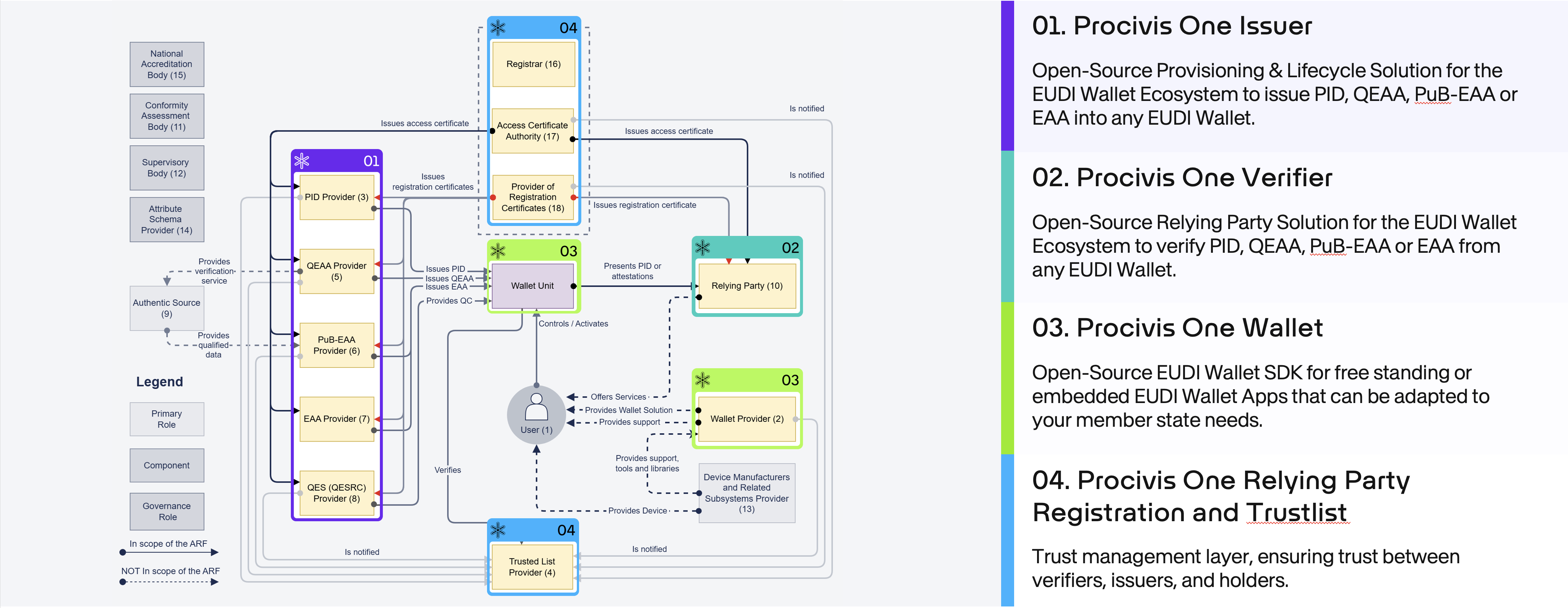
Use the Procivis One Core for Issuer or Verifier solutions. For an EUDI Wallet, use the One Core React Native SDK for embedding into an existing app, or use the Procivis One Wallet with adaptations to fit your needs.
Procivis One is built using open standards and tested to ensure interoperability with different software vendors and across different international regulatory ecosystems.
- W3C standards
- The W3C offers several test suites for standards conformance. See the latest test results for Procivis One at canivc.com.
- ISO/IEC 18013-5 mDL
- Procivis One's implementation of the ISO mDL standard is compatible with the OpenWallet Foundation's verifier: Procivis One can successfully issue mDL credentials to a Procivis One Wallet, and these credentials can successfully be verified by the OpenWallet Foundation's verifier. See the OpenWallet Foundation libraries.
- eIDAS 2.0; EUDI Wallet
We continue to look for more opportunities for interoperability testing as the standards and regulations mature and harden.
| Category | Supported |
|---|---|
| Credential formats | SD-JWT VC, ISO mdoc, W3C VC |
| Issuance protocol | OpenID4VCI |
| Presentation protocols | OpenID4VP, ISO/IEC 18013-5, ISO/IEC 18013-7 |
| Transport and engagement | BLE, MQTT, NFC, QR code |
| Revocation | Bitstring Status List, Token Status List, CRL |
| Key storage | Secure Enclave, Android Keystore, Azure Key Vault, HSM, internal database |
| DID methods | did:key, did:web, did:jwk, did:tdw |
| Trust infrastructure | ETSI Trusted Lists, Lists of Trusted Lists (LoTL), and Lists of Trusted Entities (LoTE), EUDI Access and Registration Certificates |
| Cryptographic suites | ES256, Ed25519, ML-DSA-65, BBS |
| Wallet attestations | Wallet Unit Attestation (WUA) and Wallet Instance Attestation (WIA) |
For the full list of supported standards, specifications, protocol versions, and ETSI coverage, see the Supported Standards and Technologies page in the Procivis One documentation.
Need support or have feedback? Contact us.
Some rights reserved. This library is published under the Apache License Version 2.0.

© Procivis AG, https://www.procivis.ch.